Linux X13 Gen. 6 AMD (21RM002KGE): Problem Installation Betriebssystem / Standby und Suspend funktioniert nicht.

Linux Betriebssystem

TPmicha

Member
Themenstarter
Registriert
26 März 2016
Beiträge
137
Auf meinem X13 Gen. 6 AMD (21RM002KGE) möchte ich (ausschließlich) MANJARO installieren. Mein Problem Standby und Suspend funktionieren nicht. Ich habe sowohl eine SWAP-Partition mit 64 GB (für 32 GB RAM) als auch ein SWAP-File probiert.
Das Einschalten eines dieser Modi meldet den Benutzer ab, wechselt zu einem schwarzen Bildschirm, kommt dann aber zurück zum Anmeldebildschirm.
Ich bitte um Unterstützung.
 
Danke @Christina,
das BIOS-UPdate hat funktioniert.
Da fehlt noch das Update auf die neueste UEFI-Firmware.
...
Am wahrscheinlichsten liegt der Fehler im Paket Mesa 25.1.7-arch1.1.
Ich würde aber vorher die Firmware deines X13 aktualisieren (s.o.).
Nachfolgend die aktuellen Ausgaben:
Code:
$ inxi -mM
Machine:
  Type: Laptop System: LENOVO product: 21RM002KGE v: ThinkPad X13 Gen 6
    serial: <superuser required>
  Mobo: LENOVO model: 21RM002KGE v: SDK0T76576 WIN
    serial: <superuser required> UEFI: LENOVO v: R32ET22W (1.05 )
    date: 06/05/2025
Memory:
  System RAM: total: 32 GiB available: 30.49 GiB used: 1.63 GiB (5.4%)
  Array-1: capacity: 64 GiB slots: 4 modules: 4 EC: None
  Device-1: Channel-A DIMM 0 type: LPDDR5 size: 8 GiB speed: 8000 MT/s
  Device-2: Channel-B DIMM 0 type: LPDDR5 size: 8 GiB speed: 8000 MT/s
  Device-3: Channel-C DIMM 0 type: LPDDR5 size: 8 GiB speed: 8000 MT/s
  Device-4: Channel-D DIMM 0 type: LPDDR5 size: 8 GiB speed: 8000 MT/s
Code:
$ free -m
              gesamt       benutzt     frei      gemns.  Puffer/Cache verfügbar
Speicher:      31221        1589       29042          16         988       29631
Swap:          65535           0       65535
Code:
glxinfo -B
name of display: :0
display: :0  screen: 0
direct rendering: Yes
Extended renderer info (GLX_MESA_query_renderer):
    Vendor: AMD (0x1002)
    Device: AMD Radeon 860M Graphics (radeonsi, gfx1152, LLVM 20.1.8, DRM 3.63, 6.15.9-2-MANJARO) (0x1114)
    Version: 25.1.7
    Accelerated: yes
    Video memory: 512MB
    Unified memory: no
    Preferred profile: core (0x1)
    Max core profile version: 4.6
    Max compat profile version: 4.6
    Max GLES1 profile version: 1.1
    Max GLES[23] profile version: 3.2
Memory info (GL_ATI_meminfo):
    VBO free memory - total: 125 MB, largest block: 125 MB
    VBO free aux. memory - total: 15506 MB, largest block: 15506 MB
    Texture free memory - total: 125 MB, largest block: 125 MB
    Texture free aux. memory - total: 15506 MB, largest block: 15506 MB
    Renderbuffer free memory - total: 125 MB, largest block: 125 MB
    Renderbuffer free aux. memory - total: 15506 MB, largest block: 15506 MB
Memory info (GL_NVX_gpu_memory_info):
    Dedicated video memory: 512 MB
    Total available memory: 16122 MB
    Currently available dedicated video memory: 125 MB
OpenGL vendor string: AMD
OpenGL renderer string: AMD Radeon 860M Graphics (radeonsi, gfx1152, LLVM 20.1.8, DRM 3.63, 6.15.9-2-MANJARO)
OpenGL core profile version string: 4.6 (Core Profile) Mesa 25.1.7-arch1.1
OpenGL core profile shading language version string: 4.60
OpenGL core profile context flags: (none)
OpenGL core profile profile mask: core profile

OpenGL version string: 4.6 (Compatibility Profile) Mesa 25.1.7-arch1.1
OpenGL shading language version string: 4.60
OpenGL context flags: (none)
OpenGL profile mask: compatibility profile

OpenGL ES profile version string: OpenGL ES 3.2 Mesa 25.1.7-arch1.1
OpenGL ES profile shading language version string: OpenGL ES GLSL ES 3.20


Was nun?
 
Danke @Christina,
ich habe im UEFI-Setup des ThinkPads unter: Config → Display → UMA Frame buffer Size auf 2GB gesetzt; das Ergebnis
Code:
glxinfo -B
name of display: :0
display: :0 screen: 0
direct rendering: Yes
Extended renderer info (GLX_MESA_query_renderer):
Vendor: AMD (0x1002)
Device: AMD Radeon 860M Graphics (radeonsi, gfx1152, LLVM 20.1.8, DRM 3.63, 6.15.9-2-MANJARO) (0x1114)
Version: 25.1.7
Accelerated: yes
Video memory: 2048MB
Unified memory: no
Preferred profile: core (0x1)
Max core profile version: 4.6
Max compat profile version: 4.6
Max GLES1 profile version: 1.1
Max GLES[23] profile version: 3.2
Memory info (GL_ATI_meminfo):
VBO free memory - total: 1692 MB, largest block: 1692 MB
VBO free aux. memory - total: 14758 MB, largest block: 14758 MB
Texture free memory - total: 1692 MB, largest block: 1692 MB
Texture free aux. memory - total: 14758 MB, largest block: 14758 MB
Renderbuffer free memory - total: 1692 MB, largest block: 1692 MB
Renderbuffer free aux. memory - total: 14758 MB, largest block: 14758 MB
Memory info (GL_NVX_gpu_memory_info):
Dedicated video memory: 2048 MB
Total available memory: 16902 MB
Currently available dedicated video memory: 1692 MB
OpenGL vendor string: AMD
OpenGL renderer string: AMD Radeon 860M Graphics (radeonsi, gfx1152, LLVM 20.1.8, DRM 3.63, 6.15.9-2-MANJARO)
OpenGL core profile version string: 4.6 (Core Profile) Mesa 25.1.7-arch1.1
OpenGL core profile shading language version string: 4.60
OpenGL core profile context flags: (none)
OpenGL core profile profile mask: core profile

OpenGL version string: 4.6 (Compatibility Profile) Mesa 25.1.7-arch1.1
OpenGL shading language version string: 4.60
OpenGL context flags: (none)
OpenGL profile mask: compatibility profile

OpenGL ES profile version string: OpenGL ES 3.2 Mesa 25.1.7-arch1.1
OpenGL ES profile shading language version string: OpenGL ES GLSL ES 3.20

 

Anhänge

  • screenshot2.png
    screenshot2.png
    940,8 KB · Aufrufe: 3
Im UEFI-Setup unter: Config → Display → UMA Frame buffer Size
Beim X13 Gen6 AMD: [Auto ] [1G ] [2G ] [4G ] [8G ] [16G ] [32G ] [48G ]


In Einstellung [ Auto ] werden 512 MiB der GPU fest zugeordnet, in Einstellung [ 2G ] sind es 2048 MiB.
Total available memory aus glxinfo bezieht sich auf die zugeordnete RAM-Größe fest + dynamisch.

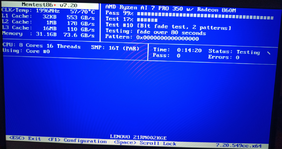
Danke fürs Foto von Memtest86+, aber die Geschwindigkeitsangaben passen leider nicht wirklich zu meinem P14s.
Bei mir läuft das RAM nur im Single Channel Mode, weil aktuell nur 1×16 GiB DDR5-5600 eingesteckt sind.
Bei deinem X13 ist aber 4×8 GiB LPDDR5-8000 aufgelötet, das etwas höher taktet (und etwas sparsamer ist).
Alles in Ordnung soweit!:)

Letzte Frage:
Wozu brauchst du 64 GiB Swap? Hast du das so eingerichtet oder die Installationsroutine von Manjaro?

P.S.
Bei Suspend to Disk wird der RAM-Inhalt komprimiert nach Swap gespeichert, wodurch sich per Grundeinstellung eine Größe von 40% ergibt,
was ein Kompromiss aus Swap-Space-Belegung und Zeitbedarf für die Komprimierung & Dekomprimierung ist.
Siehe: kernel.org/doc/Documentation/ABI/testing/sysfs-power unter /sys/power/image_size (August 2006),
sowie das Wiki: archlinux: Power management/Suspend and hibernate
 
Zuletzt bearbeitet:
  • ok1.de
  • thinkstore24.de
  • ok2.de - Notebook Computer Server
  • Preiswerte-IT - Gebrauchte Lenovo Notebooks kaufen

Werbung

Zurück
Oben