Gobi 2000 - Verbindung klappt nicht

The EYE

Active member
Themenstarter
Registriert
9 Okt. 2008
Beiträge
1.210
Hallo liebes Forum!

Morgen stehen mir viele Stunden im Zug bevor, wofür ich dann doch gerne mein WWAN zum Laufen kriegen würde. Es handelt sich um ein x201t (Gobi 2000) mit Ubuntu 12.04.

Zur Installation habe ich mich an die Anleitung im thin-wiki gehalten. Um an die benötigten Firmwaredateien zu kommen, habe ich mich für die Downloadmethode entschieden. An dieser Stelle würde ich mich gerne bei linrunner und blafoo für die tolle Ausarbeitung und die Bereitstellung der Dateien bedanken! :thumbup:
Die Installation schein geklappt zu haben:
Code:
lsusb
liefert
Code:
Bus 001 Device 002: ID 8087:0020 Intel Corp. Integrated Rate Matching Hub
Bus 002 Device 002: ID 8087:0020 Intel Corp. Integrated Rate Matching Hub
Bus 001 Device 001: ID 1d6b:0002 Linux Foundation 2.0 root hub
Bus 002 Device 001: ID 1d6b:0002 Linux Foundation 2.0 root hub
Bus 001 Device 012: ID 1bcf:0c31 Sunplus Innovation Technology Inc. Serial-ATA bridge
Bus 001 Device 008: ID 046d:0807 Logitech, Inc. Webcam B500
Bus 001 Device 011: ID 1532:0101 Razer USA, Ltd Copperhead Mouse
Bus 001 Device 009: ID 05ac:1005 Apple, Inc. 
Bus 001 Device 003: ID 147e:2016 Upek Biometric Touchchip/Touchstrip Fingerprint Sensor
Bus 001 Device 004: ID 17ef:1005 Lenovo 
Bus 001 Device 005: ID 17ef:4816 Lenovo 
[COLOR=#ff0000][B]Bus 002 Device 004: ID 05c6:9205 Qualcomm, Inc. [/B][/COLOR]
Bus 001 Device 010: ID 05ac:021e Apple, Inc. Aluminum Mini Keyboard (ISO)
Bus 001 Device 006: ID 2001:f103 D-Link Corp. DUB-H7 7-port USB 2.0 hub
Bus 001 Device 007: ID 2001:f103 D-Link Corp. DUB-H7 7-port USB 2.0 hub
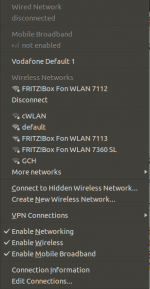
Die Karte ist also betriebsbereit. Nach dem Aktivieren (WWAN an und beim Networkmanager "Enable Mobile Broadband" aktiviert), habe ich über den Assistenten eine Verbindung (Vodafone) angelegt. Ich dachte erst ich hätte dort vllt etwas falsch gemacht, dem scheint aber (nach google Recherche) nicht so :confused:
Naja, ich werde jedenfalls auch nach dem PIN gefragt, eine Verbindung kann jedoch leider nicht hergestellt werden. Was ist nun zu tun?

Gruß Max
 
Moin

der NM stellt die Verbindung bei WWAN nicht automatisch her.
Du musst die selber aktivieren, indem Du auf deinen Vodafone-Eintrag klickst.

Ansonsten hilft Dir wie immer ein Blick ins Logfile. Da steht dann drin, was nicht funktioniert hat.

RomanX
 
Ich habs nie hinbekommen eine saubere Verbindung mit der Gobi2000 unter Linux hinzubekommen.

Erst nachdem ich die Karte im AC unter Windows aktiviert habe konnte ich sie unter Linux nutzen

Das Teil ist für Linux schlichtweg müll ^^

Grüße
 
Bei mir war es genau andersherum. Ich hatte es in meinem T410 nie hinbekommen das Dingen unter Windows zum laufen zu bewegen. Unter 12.04 war das allerdings sehr problemlos...:)
 
Hi-Ho the EYE,
hallo Max,
die LED für WWAN leuchtet und im Networkmanager hast zu den dritten Reiter von oben für die das Funknetzwerk mit einem Häkchen versehen?
Dann öffnest du jetzt den Browser und rufst die Startseite deines Anbieters (N24, Sat1, Tchibo oder gar Vodafone selbst) auf. Die Verbindung zur Stick-Startseite müsste sich aufbauen. Hier wählst du nun die Zahlart für die Internetsession aus und folgst dem Anmeldepfad.
All das hat aber RomanX auch geschrieben, fiel mir gerade auf. :facepalm:
Viel Spaß beim Surfen.
 
Musste gerade erschrocken feststellen, dass die WWAN Lampe nicht leuchtet :pinch:

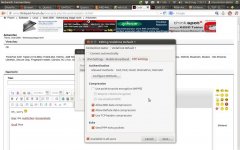
Hier ein bisschen Code + Bilder zum Verständnis:

(TLP Stromspareinstellungen)
Code:
wwan on
ergibt
Code:
wwan = on
aber die Lampe leuchtet nicht. Ging aber mal, was ist da los? :confused: Hatte es damals nach der TLP Installation beim Starten deaktiviert und mich erst jetzt wieder darum gekümmert, falls das hilft.

Und natürlich habe ich das Profil zum Verbinden selbst gewählt, bringt natürlich nichts, wenn WWAN nicht leuchtet... :cursing:
Wie gehe ich nun weiter vor?

Gruß Max
 
Habs versucht, hat leider nicht geholfen. Habe die TLP Einstellungen dahingehend geändert, dass wifi und wwan beim Systemstart aktiviert werden, wifi bleibt weiterhin aus. Allerdings leuchtet während des Starts (bevor das System vollständig gebootet ist) die WWAN Lampe :confused:

Gruß Max
 
Zeig mal bitte
Code:
rfkill list
sudo tlp-stat

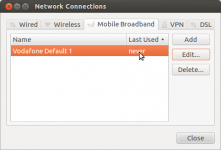
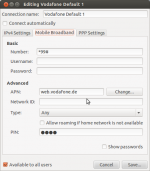
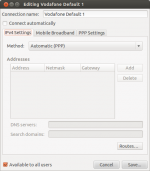
Außerdem wäre es nett zu erfahren von welchem Provider wir reden und welche Einstellungen Du verwendest -> Screenshots aus dem Network Manager.
 
Zuletzt bearbeitet:
Code:
rfkill list
Code:
0: tpacpi_bluetooth_sw: Bluetooth
    Soft blocked: yes
    Hard blocked: no
1: tpacpi_wwan_sw: Wireless WAN
    Soft blocked: no
    Hard blocked: no
2: phy0: Wireless LAN
    Soft blocked: no
    Hard blocked: no

Code:
sudo tlp-stat
Code:
--- TLP 0.3.9 --------------------------------------------

+++ Configured Settings: /etc/default/tlp
TLP_ENABLE=1
DISK_IDLE_SECS_ON_AC=0
DISK_IDLE_SECS_ON_BAT=0
MAX_LOST_WORK_SECS_ON_AC=15
MAX_LOST_WORK_SECS_ON_BAT=60
SCHED_POWERSAVE_ON_AC=0
SCHED_POWERSAVE_ON_BAT=1
NMI_WATCHDOG=0
DISK_DEVICES="sda sdb"
DISK_APM_LEVEL_ON_AC="254 254"
DISK_APM_LEVEL_ON_BAT="254 254"
SATA_LINKPWR_ON_AC=max_performance
SATA_LINKPWR_ON_BAT=min_power
PCIE_ASPM_ON_AC=performance
PCIE_ASPM_ON_BAT=powersave
RADEON_POWER_PROFILE_ON_AC=high
RADEON_POWER_PROFILE_ON_BAT=low
WIFI_PWR_ON_AC=1
WIFI_PWR_ON_BAT=5
WOL_DISABLE=Y
SOUND_POWER_SAVE=1
SOUND_POWER_SAVE_CONTROLLER=Y
BAY_POWEROFF_ON_BAT=0
BAY_DEVICE="sr0"
RUNTIME_PM_ON_AC=on
RUNTIME_PM_ON_BAT=auto
RUNTIME_PM_ALL=0
USB_AUTOSUSPEND=1
RESTORE_DEVICE_STATE_ON_STARTUP=0
DEVICES_TO_DISABLE_ON_STARTUP="bluetooth wwan"

+++ System Info
System         = LENOVO ThinkPad X201 Tablet 311396G
BIOS           = 6QET68WW (1.38 )
Release        = Ubuntu 12.04.2 LTS
Kernel         = 3.5.0-37-generic x86_64
/proc/cmdline  = BOOT_IMAGE=/boot/vmlinuz-3.5.0-37-generic root=UUID=595a93f9-38c0-446d-9d3f-5f6b636f6264 ro quiet splash vt.handoff=7

+++ System Status
TLP power save = enabled
power source   = battery

+++ Processor
CPU Model      = Intel(R) Core(TM) i7 CPU       L 640  @ 2.13GHz

/sys/devices/system/cpu/cpu0/cpufreq/scaling_governor  = ondemand
/sys/devices/system/cpu/cpu0/cpufreq/scaling_min_freq  =  1199000 [kHz]
/sys/devices/system/cpu/cpu0/cpufreq/scaling_max_freq  =  2134000 [kHz]
/sys/devices/system/cpu/cpu0/cpufreq/scaling_available_frequencies = 2134000 2133000 1999000 1866000 1733000 1599000 1466000 1333000 1199000 [kHz]

/sys/devices/system/cpu/cpu1/cpufreq/scaling_governor  = ondemand
/sys/devices/system/cpu/cpu1/cpufreq/scaling_min_freq  =  1199000 [kHz]
/sys/devices/system/cpu/cpu1/cpufreq/scaling_max_freq  =  2134000 [kHz]
/sys/devices/system/cpu/cpu1/cpufreq/scaling_available_frequencies = 2134000 2133000 1999000 1866000 1733000 1599000 1466000 1333000 1199000 [kHz]

/sys/devices/system/cpu/cpu2/cpufreq/scaling_governor  = ondemand
/sys/devices/system/cpu/cpu2/cpufreq/scaling_min_freq  =  1199000 [kHz]
/sys/devices/system/cpu/cpu2/cpufreq/scaling_max_freq  =  2134000 [kHz]
/sys/devices/system/cpu/cpu2/cpufreq/scaling_available_frequencies = 2134000 2133000 1999000 1866000 1733000 1599000 1466000 1333000 1199000 [kHz]

/sys/devices/system/cpu/cpu3/cpufreq/scaling_governor  = ondemand
/sys/devices/system/cpu/cpu3/cpufreq/scaling_min_freq  =  1199000 [kHz]
/sys/devices/system/cpu/cpu3/cpufreq/scaling_max_freq  =  2134000 [kHz]
/sys/devices/system/cpu/cpu3/cpufreq/scaling_available_frequencies = 2134000 2133000 1999000 1866000 1733000 1599000 1466000 1333000 1199000 [kHz]

/sys/devices/system/cpu/cpufreq/boost                  = (not available)
/proc/sys/kernel/nmi_watchdog                          = 0

+++ Undervolting
PHC kernel not available.

+++ Temperatures
/proc/acpi/ibm/thermal = 52 0 0 0 0 0 0 0 [°C]
/proc/acpi/ibm/fan     =  3940 [/min]

+++ File System
/proc/sys/vm/laptop_mode               =     0
/proc/sys/vm/dirty_writeback_centisecs =  6000
/proc/sys/vm/dirty_expire_centisecs    =  6000
/proc/sys/vm/dirty_ratio               =    60
/proc/sys/vm/dirty_background_ratio    =    40
/proc/sys/fs/xfs/age_buffer_centisecs  = (not available)
/proc/sys/fs/xfs/xfssyncd_centisecs    = (not available)
/proc/sys/fs/xfs/xfsbufd_centisecs     = (not available)

+++ Storage Devices
/dev/sda:
          Model     = Samsung SSD 840 PRO Series              
          Firmware  = DXM05B0Q
          APM Level = none/disabled
          Status    = active/idle
          TRIM      = supported
          scheduler = deadline

        SMART info:
            5 Reallocated_Sector_Ct     =        0 
            9 Power_On_Hours            =      194 [h]
          177 Wear_Leveling_Count       =       99 [%]
          179 Used_Rsvd_Blk_Cnt_Tot     =        0 
          190 Airflow_Temperature_Cel   =       39 [°C]
          241 Total_LBAs_Written        =    0.213 [TB]


+++ SATA Aggressive Link Power Management
/sys/class/scsi_host/host0/link_power_management_policy  = min_power
/sys/class/scsi_host/host1/link_power_management_policy  = min_power
/sys/class/scsi_host/host2/link_power_management_policy  = min_power
/sys/class/scsi_host/host3/link_power_management_policy  = min_power
/sys/class/scsi_host/host4/link_power_management_policy  = min_power
/sys/class/scsi_host/host5/link_power_management_policy  = min_power

+++ PCIe Active State Power Management
/sys/module/pcie_aspm/parameters/policy = default (using bios preferences)

+++ Intel Graphics
/sys/module/i915/parameters/powersave        =  1 (enabled)
/sys/module/i915/parameters/i915_enable_rc6  = -1 (use per-chip default)
/sys/module/i915/parameters/i915_enable_fbc  = -1 (use per-chip default)
/sys/module/i915/parameters/lvds_downclock   =  0 (disabled)
/sys/module/i915/parameters/semaphores       = -1 (use per-chip default)

+++ Wireless
bluetooth = off (software)
wifi      = on
wwan      = on

wlan0(iwlwifi): power management = on

+++ Audio
/sys/module/snd_hda_intel/parameters/power_save            = 1
/sys/module/snd_hda_intel/parameters/power_save_controller = Y

+++ ThinkPad Extended Battery Functions
tp-smapi   = active
tpacpi-bat = inactive (kernel module 'acpi_call' not installed)

+++ ThinkPad Battery Status (Main)
/sys/devices/platform/smapi/BAT0/manufacturer               = SANYO
/sys/devices/platform/smapi/BAT0/model                      = 42T4658
/sys/devices/platform/smapi/BAT0/manufacture_date           = 2011-03-09
/sys/devices/platform/smapi/BAT0/first_use_date             = 2011-05-27
/sys/devices/platform/smapi/BAT0/cycle_count                =    274
/sys/devices/platform/smapi/BAT0/design_capacity            =  66240 [mWh]
/sys/devices/platform/smapi/BAT0/last_full_capacity         =  40450 [mWh]
/sys/devices/platform/smapi/BAT0/remaining_capacity         =  27600 [mWh]
/sys/devices/platform/smapi/BAT0/remaining_percent          =     68 [%]
/sys/devices/platform/smapi/BAT0/remaining_running_time_now =     63 [min]
/sys/devices/platform/smapi/BAT0/remaining_charging_time    = not_charging [min]
/sys/devices/platform/smapi/BAT0/power_now                  = -20479 [mW]
/sys/devices/platform/smapi/BAT0/power_avg                  = -13173 [mW]

/sys/devices/platform/smapi/BAT0/start_charge_thresh        =     96 [%]
/sys/devices/platform/smapi/BAT0/stop_charge_thresh         =    100 [%]
/sys/devices/platform/smapi/BAT0/force_discharge            =      0

+++ Runtime Power Management
/sys/bus/pci/devices/0000:00:00.0/power/control = auto (0x060000 Host bridge)
/sys/bus/pci/devices/0000:00:02.0/power/control = on   (0x030000 VGA compatible controller)
/sys/bus/pci/devices/0000:00:16.0/power/control = on   (0x078000 Communication controller)
/sys/bus/pci/devices/0000:00:16.3/power/control = on   (0x070002 Serial controller)
/sys/bus/pci/devices/0000:00:19.0/power/control = auto (0x020000 Ethernet controller)
/sys/bus/pci/devices/0000:00:1a.0/power/control = on   (0x0c0320 USB controller)
/sys/bus/pci/devices/0000:00:1b.0/power/control = auto (0x040300 Audio device)
/sys/bus/pci/devices/0000:00:1c.0/power/control = on   (0x060400 PCI bridge)
/sys/bus/pci/devices/0000:00:1c.3/power/control = on   (0x060400 PCI bridge)
/sys/bus/pci/devices/0000:00:1c.4/power/control = on   (0x060400 PCI bridge)
/sys/bus/pci/devices/0000:00:1d.0/power/control = on   (0x0c0320 USB controller)
/sys/bus/pci/devices/0000:00:1e.0/power/control = on   (0x060401 PCI bridge)
/sys/bus/pci/devices/0000:00:1f.0/power/control = on   (0x060100 ISA bridge)
/sys/bus/pci/devices/0000:00:1f.2/power/control = on   (0x010601 SATA controller)
/sys/bus/pci/devices/0000:00:1f.3/power/control = on   (0x0c0500 SMBus)
/sys/bus/pci/devices/0000:00:1f.6/power/control = on   (0x118000 Signal processing controller)
/sys/bus/pci/devices/0000:02:00.0/power/control = auto (0x028000 Network controller)
/sys/bus/pci/devices/0000:ff:00.0/power/control = auto (0x060000 Host bridge)
/sys/bus/pci/devices/0000:ff:00.1/power/control = auto (0x060000 Host bridge)
/sys/bus/pci/devices/0000:ff:02.0/power/control = auto (0x060000 Host bridge)
/sys/bus/pci/devices/0000:ff:02.1/power/control = auto (0x060000 Host bridge)
/sys/bus/pci/devices/0000:ff:02.2/power/control = auto (0x060000 Host bridge)
/sys/bus/pci/devices/0000:ff:02.3/power/control = auto (0x060000 Host bridge)

+++ USB
tlp usb autosuspend = enabled
tlp usb blacklist   = (not configured)

Bus 001 Device 002 ID 8087:0020 control = auto, autosuspend_delay_ms =  2000 -- Intel Corp. Integrated Rate Matching Hub (hub)
Bus 002 Device 002 ID 8087:0020 control = auto, autosuspend_delay_ms =  2000 -- Intel Corp. Integrated Rate Matching Hub (hub)
Bus 001 Device 001 ID 1d6b:0002 control = auto, autosuspend_delay_ms =  2000 -- Linux Foundation 2.0 root hub (hub)
Bus 002 Device 001 ID 1d6b:0002 control = auto, autosuspend_delay_ms =  2000 -- Linux Foundation 2.0 root hub (hub)
Bus 001 Device 004 ID 147e:2016 control = auto, autosuspend_delay_ms =  2000 -- Upek Biometric Touchchip/Touchstrip Fingerprint Sensor (no driver)
Bus 001 Device 005 ID 17ef:4816 control = auto, autosuspend_delay_ms =  2000 -- Lenovo  (uvcvideo)
Bus 002 Device 003 ID 05c6:9205 control = auto, autosuspend_delay_ms =  2000 -- Qualcomm, Inc.  (qmi_wwan, qcserial)

Und hier noch die versprochenen Bilder, die ich vorher vergessen hate :rolleyes:

Gruß Max
 

Anhänge

  • Screenshot from 2013-08-07 19:18:18.png
    Screenshot from 2013-08-07 19:18:18.png
    40,1 KB · Aufrufe: 10
  • Screenshot from 2013-08-07 19:18:44.png
    Screenshot from 2013-08-07 19:18:44.png
    27,5 KB · Aufrufe: 11
  • Screenshot from 2013-08-07 19:19:04.png
    Screenshot from 2013-08-07 19:19:04.png
    52,8 KB · Aufrufe: 10
Habe ich welche vergessen? Ich glaube nicht - mache es einfach nochmal!

Code:
sudo tlp-stat
Code:
--- TLP 0.3.9 --------------------------------------------

+++ Configured Settings: /etc/default/tlp
TLP_ENABLE=1
DISK_IDLE_SECS_ON_AC=0
DISK_IDLE_SECS_ON_BAT=0
MAX_LOST_WORK_SECS_ON_AC=15
MAX_LOST_WORK_SECS_ON_BAT=60
SCHED_POWERSAVE_ON_AC=0
SCHED_POWERSAVE_ON_BAT=1
NMI_WATCHDOG=0
DISK_DEVICES="sda sdb"
DISK_APM_LEVEL_ON_AC="254 254"
DISK_APM_LEVEL_ON_BAT="254 254"
SATA_LINKPWR_ON_AC=max_performance
SATA_LINKPWR_ON_BAT=min_power
PCIE_ASPM_ON_AC=performance
PCIE_ASPM_ON_BAT=powersave
RADEON_POWER_PROFILE_ON_AC=high
RADEON_POWER_PROFILE_ON_BAT=low
WIFI_PWR_ON_AC=1
WIFI_PWR_ON_BAT=5
WOL_DISABLE=Y
SOUND_POWER_SAVE=1
SOUND_POWER_SAVE_CONTROLLER=Y
BAY_POWEROFF_ON_BAT=0
BAY_DEVICE="sr0"
RUNTIME_PM_ON_AC=on
RUNTIME_PM_ON_BAT=auto
RUNTIME_PM_ALL=0
USB_AUTOSUSPEND=1
RESTORE_DEVICE_STATE_ON_STARTUP=0
DEVICES_TO_DISABLE_ON_STARTUP="bluetooth wwan"

+++ System Info
System         = LENOVO ThinkPad X201 Tablet 311396G
BIOS           = 6QET68WW (1.38 )
Release        = Ubuntu 12.04.2 LTS
Kernel         = 3.5.0-37-generic x86_64
/proc/cmdline  = BOOT_IMAGE=/boot/vmlinuz-3.5.0-37-generic root=UUID=595a93f9-38c0-446d-9d3f-5f6b636f6264 ro quiet splash vt.handoff=7

+++ System Status
TLP power save = enabled
power source   = battery

+++ Processor
CPU Model      = Intel(R) Core(TM) i7 CPU       L 640  @ 2.13GHz

/sys/devices/system/cpu/cpu0/cpufreq/scaling_governor  = ondemand
/sys/devices/system/cpu/cpu0/cpufreq/scaling_min_freq  =  1199000 [kHz]
/sys/devices/system/cpu/cpu0/cpufreq/scaling_max_freq  =  2134000 [kHz]
/sys/devices/system/cpu/cpu0/cpufreq/scaling_available_frequencies = 2134000 2133000 1999000 1866000 1733000 1599000 1466000 1333000 1199000 [kHz]

/sys/devices/system/cpu/cpu1/cpufreq/scaling_governor  = ondemand
/sys/devices/system/cpu/cpu1/cpufreq/scaling_min_freq  =  1199000 [kHz]
/sys/devices/system/cpu/cpu1/cpufreq/scaling_max_freq  =  2134000 [kHz]
/sys/devices/system/cpu/cpu1/cpufreq/scaling_available_frequencies = 2134000 2133000 1999000 1866000 1733000 1599000 1466000 1333000 1199000 [kHz]

/sys/devices/system/cpu/cpu2/cpufreq/scaling_governor  = ondemand
/sys/devices/system/cpu/cpu2/cpufreq/scaling_min_freq  =  1199000 [kHz]
/sys/devices/system/cpu/cpu2/cpufreq/scaling_max_freq  =  2134000 [kHz]
/sys/devices/system/cpu/cpu2/cpufreq/scaling_available_frequencies = 2134000 2133000 1999000 1866000 1733000 1599000 1466000 1333000 1199000 [kHz]

/sys/devices/system/cpu/cpu3/cpufreq/scaling_governor  = ondemand
/sys/devices/system/cpu/cpu3/cpufreq/scaling_min_freq  =  1199000 [kHz]
/sys/devices/system/cpu/cpu3/cpufreq/scaling_max_freq  =  2134000 [kHz]
/sys/devices/system/cpu/cpu3/cpufreq/scaling_available_frequencies = 2134000 2133000 1999000 1866000 1733000 1599000 1466000 1333000 1199000 [kHz]

/sys/devices/system/cpu/cpufreq/boost                  = (not available)
/proc/sys/kernel/nmi_watchdog                          = 0

+++ Undervolting
PHC kernel not available.

+++ Temperatures
/proc/acpi/ibm/thermal = 52 0 0 0 0 0 0 0 [°C]
/proc/acpi/ibm/fan     =  3940 [/min]

+++ File System
/proc/sys/vm/laptop_mode               =     0
/proc/sys/vm/dirty_writeback_centisecs =  6000
/proc/sys/vm/dirty_expire_centisecs    =  6000
/proc/sys/vm/dirty_ratio               =    60
/proc/sys/vm/dirty_background_ratio    =    40
/proc/sys/fs/xfs/age_buffer_centisecs  = (not available)
/proc/sys/fs/xfs/xfssyncd_centisecs    = (not available)
/proc/sys/fs/xfs/xfsbufd_centisecs     = (not available)

+++ Storage Devices
/dev/sda:
          Model     = Samsung SSD 840 PRO Series              
          Firmware  = DXM05B0Q
          APM Level = none/disabled
          Status    = active/idle
          TRIM      = supported
          scheduler = deadline

        SMART info:
            5 Reallocated_Sector_Ct     =        0 
            9 Power_On_Hours            =      194 [h]
          177 Wear_Leveling_Count       =       99 [%]
          179 Used_Rsvd_Blk_Cnt_Tot     =        0 
          190 Airflow_Temperature_Cel   =       39 [°C]
          241 Total_LBAs_Written        =    0.213 [TB]


+++ SATA Aggressive Link Power Management
/sys/class/scsi_host/host0/link_power_management_policy  = min_power
/sys/class/scsi_host/host1/link_power_management_policy  = min_power
/sys/class/scsi_host/host2/link_power_management_policy  = min_power
/sys/class/scsi_host/host3/link_power_management_policy  = min_power
/sys/class/scsi_host/host4/link_power_management_policy  = min_power
/sys/class/scsi_host/host5/link_power_management_policy  = min_power

+++ PCIe Active State Power Management
/sys/module/pcie_aspm/parameters/policy = default (using bios preferences)

+++ Intel Graphics
/sys/module/i915/parameters/powersave        =  1 (enabled)
/sys/module/i915/parameters/i915_enable_rc6  = -1 (use per-chip default)
/sys/module/i915/parameters/i915_enable_fbc  = -1 (use per-chip default)
/sys/module/i915/parameters/lvds_downclock   =  0 (disabled)
/sys/module/i915/parameters/semaphores       = -1 (use per-chip default)

+++ Wireless
bluetooth = off (software)
wifi      = on
wwan      = on

wlan0(iwlwifi): power management = on

+++ Audio
/sys/module/snd_hda_intel/parameters/power_save            = 1
/sys/module/snd_hda_intel/parameters/power_save_controller = Y

+++ ThinkPad Extended Battery Functions
tp-smapi   = active
tpacpi-bat = inactive (kernel module 'acpi_call' not installed)

+++ ThinkPad Battery Status (Main)
/sys/devices/platform/smapi/BAT0/manufacturer               = SANYO
/sys/devices/platform/smapi/BAT0/model                      = 42T4658
/sys/devices/platform/smapi/BAT0/manufacture_date           = 2011-03-09
/sys/devices/platform/smapi/BAT0/first_use_date             = 2011-05-27
/sys/devices/platform/smapi/BAT0/cycle_count                =    274
/sys/devices/platform/smapi/BAT0/design_capacity            =  66240 [mWh]
/sys/devices/platform/smapi/BAT0/last_full_capacity         =  40450 [mWh]
/sys/devices/platform/smapi/BAT0/remaining_capacity         =  27600 [mWh]
/sys/devices/platform/smapi/BAT0/remaining_percent          =     68 [%]
/sys/devices/platform/smapi/BAT0/remaining_running_time_now =     63 [min]
/sys/devices/platform/smapi/BAT0/remaining_charging_time    = not_charging [min]
/sys/devices/platform/smapi/BAT0/power_now                  = -20479 [mW]
/sys/devices/platform/smapi/BAT0/power_avg                  = -13173 [mW]

/sys/devices/platform/smapi/BAT0/start_charge_thresh        =     96 [%]
/sys/devices/platform/smapi/BAT0/stop_charge_thresh         =    100 [%]
/sys/devices/platform/smapi/BAT0/force_discharge            =      0

+++ Runtime Power Management
/sys/bus/pci/devices/0000:00:00.0/power/control = auto (0x060000 Host bridge)
/sys/bus/pci/devices/0000:00:02.0/power/control = on   (0x030000 VGA compatible controller)
/sys/bus/pci/devices/0000:00:16.0/power/control = on   (0x078000 Communication controller)
/sys/bus/pci/devices/0000:00:16.3/power/control = on   (0x070002 Serial controller)
/sys/bus/pci/devices/0000:00:19.0/power/control = auto (0x020000 Ethernet controller)
/sys/bus/pci/devices/0000:00:1a.0/power/control = on   (0x0c0320 USB controller)
/sys/bus/pci/devices/0000:00:1b.0/power/control = auto (0x040300 Audio device)
/sys/bus/pci/devices/0000:00:1c.0/power/control = on   (0x060400 PCI bridge)
/sys/bus/pci/devices/0000:00:1c.3/power/control = on   (0x060400 PCI bridge)
/sys/bus/pci/devices/0000:00:1c.4/power/control = on   (0x060400 PCI bridge)
/sys/bus/pci/devices/0000:00:1d.0/power/control = on   (0x0c0320 USB controller)
/sys/bus/pci/devices/0000:00:1e.0/power/control = on   (0x060401 PCI bridge)
/sys/bus/pci/devices/0000:00:1f.0/power/control = on   (0x060100 ISA bridge)
/sys/bus/pci/devices/0000:00:1f.2/power/control = on   (0x010601 SATA controller)
/sys/bus/pci/devices/0000:00:1f.3/power/control = on   (0x0c0500 SMBus)
/sys/bus/pci/devices/0000:00:1f.6/power/control = on   (0x118000 Signal processing controller)
/sys/bus/pci/devices/0000:02:00.0/power/control = auto (0x028000 Network controller)
/sys/bus/pci/devices/0000:ff:00.0/power/control = auto (0x060000 Host bridge)
/sys/bus/pci/devices/0000:ff:00.1/power/control = auto (0x060000 Host bridge)
/sys/bus/pci/devices/0000:ff:02.0/power/control = auto (0x060000 Host bridge)
/sys/bus/pci/devices/0000:ff:02.1/power/control = auto (0x060000 Host bridge)
/sys/bus/pci/devices/0000:ff:02.2/power/control = auto (0x060000 Host bridge)
/sys/bus/pci/devices/0000:ff:02.3/power/control = auto (0x060000 Host bridge)

+++ USB
tlp usb autosuspend = enabled
tlp usb blacklist   = (not configured)

Bus 001 Device 002 ID 8087:0020 control = auto, autosuspend_delay_ms =  2000 -- Intel Corp. Integrated Rate Matching Hub (hub)
Bus 002 Device 002 ID 8087:0020 control = auto, autosuspend_delay_ms =  2000 -- Intel Corp. Integrated Rate Matching Hub (hub)
Bus 001 Device 001 ID 1d6b:0002 control = auto, autosuspend_delay_ms =  2000 -- Linux Foundation 2.0 root hub (hub)
Bus 002 Device 001 ID 1d6b:0002 control = auto, autosuspend_delay_ms =  2000 -- Linux Foundation 2.0 root hub (hub)
Bus 001 Device 004 ID 147e:2016 control = auto, autosuspend_delay_ms =  2000 -- Upek Biometric Touchchip/Touchstrip Fingerprint Sensor (no driver)
Bus 001 Device 005 ID 17ef:4816 control = auto, autosuspend_delay_ms =  2000 -- Lenovo  (uvcvideo)
Bus 002 Device 003 ID 05c6:9205 control = auto, autosuspend_delay_ms =  2000 -- Qualcomm, Inc.  (qmi_wwan, qcserial)

max@max-x201t:~$ clear

max@max-x201t:~$ rf
rfcomm  rfkill  
max@max-x201t:~$ rfkill list
0: tpacpi_bluetooth_sw: Bluetooth
    Soft blocked: yes
    Hard blocked: no
1: tpacpi_wwan_sw: Wireless WAN
    Soft blocked: no
    Hard blocked: no
2: phy0: Wireless LAN
    Soft blocked: no
    Hard blocked: no
max@max-x201t:~$ sudo tlp-stat
--- TLP 0.3.9 --------------------------------------------

+++ Configured Settings: /etc/default/tlp
TLP_ENABLE=1
DISK_IDLE_SECS_ON_AC=0
DISK_IDLE_SECS_ON_BAT=0
MAX_LOST_WORK_SECS_ON_AC=15
MAX_LOST_WORK_SECS_ON_BAT=60
SCHED_POWERSAVE_ON_AC=0
SCHED_POWERSAVE_ON_BAT=1
NMI_WATCHDOG=0
DISK_DEVICES="sda sdb"
DISK_APM_LEVEL_ON_AC="254 254"
DISK_APM_LEVEL_ON_BAT="254 254"
SATA_LINKPWR_ON_AC=max_performance
SATA_LINKPWR_ON_BAT=min_power
PCIE_ASPM_ON_AC=performance
PCIE_ASPM_ON_BAT=powersave
RADEON_POWER_PROFILE_ON_AC=high
RADEON_POWER_PROFILE_ON_BAT=low
WIFI_PWR_ON_AC=1
WIFI_PWR_ON_BAT=5
WOL_DISABLE=Y
SOUND_POWER_SAVE=1
SOUND_POWER_SAVE_CONTROLLER=Y
BAY_POWEROFF_ON_BAT=0
BAY_DEVICE="sr0"
RUNTIME_PM_ON_AC=on
RUNTIME_PM_ON_BAT=auto
RUNTIME_PM_ALL=0
USB_AUTOSUSPEND=1
RESTORE_DEVICE_STATE_ON_STARTUP=0
DEVICES_TO_DISABLE_ON_STARTUP="bluetooth wwan"

+++ System Info
System         = LENOVO ThinkPad X201 Tablet 311396G
BIOS           = 6QET68WW (1.38 )
Release        = Ubuntu 12.04.2 LTS
Kernel         = 3.5.0-37-generic x86_64
/proc/cmdline  = BOOT_IMAGE=/boot/vmlinuz-3.5.0-37-generic root=UUID=595a93f9-38c0-446d-9d3f-5f6b636f6264 ro quiet splash vt.handoff=7

+++ System Status
TLP power save = enabled
power source   = battery

+++ Processor
CPU Model      = Intel(R) Core(TM) i7 CPU       L 640  @ 2.13GHz

/sys/devices/system/cpu/cpu0/cpufreq/scaling_governor  = ondemand
/sys/devices/system/cpu/cpu0/cpufreq/scaling_min_freq  =  1199000 [kHz]
/sys/devices/system/cpu/cpu0/cpufreq/scaling_max_freq  =  2134000 [kHz]
/sys/devices/system/cpu/cpu0/cpufreq/scaling_available_frequencies = 2134000 2133000 1999000 1866000 1733000 1599000 1466000 1333000 1199000 [kHz]

/sys/devices/system/cpu/cpu1/cpufreq/scaling_governor  = ondemand
/sys/devices/system/cpu/cpu1/cpufreq/scaling_min_freq  =  1199000 [kHz]
/sys/devices/system/cpu/cpu1/cpufreq/scaling_max_freq  =  2134000 [kHz]
/sys/devices/system/cpu/cpu1/cpufreq/scaling_available_frequencies = 2134000 2133000 1999000 1866000 1733000 1599000 1466000 1333000 1199000 [kHz]

/sys/devices/system/cpu/cpu2/cpufreq/scaling_governor  = ondemand
/sys/devices/system/cpu/cpu2/cpufreq/scaling_min_freq  =  1199000 [kHz]
/sys/devices/system/cpu/cpu2/cpufreq/scaling_max_freq  =  2134000 [kHz]
/sys/devices/system/cpu/cpu2/cpufreq/scaling_available_frequencies = 2134000 2133000 1999000 1866000 1733000 1599000 1466000 1333000 1199000 [kHz]

/sys/devices/system/cpu/cpu3/cpufreq/scaling_governor  = ondemand
/sys/devices/system/cpu/cpu3/cpufreq/scaling_min_freq  =  1199000 [kHz]
/sys/devices/system/cpu/cpu3/cpufreq/scaling_max_freq  =  2134000 [kHz]
/sys/devices/system/cpu/cpu3/cpufreq/scaling_available_frequencies = 2134000 2133000 1999000 1866000 1733000 1599000 1466000 1333000 1199000 [kHz]

/sys/devices/system/cpu/cpufreq/boost                  = (not available)
/proc/sys/kernel/nmi_watchdog                          = 0

+++ Undervolting
PHC kernel not available.

+++ Temperatures
/proc/acpi/ibm/thermal = 51 0 0 0 0 0 0 0 [°C]
/proc/acpi/ibm/fan     =  1954 [/min]

+++ File System
/proc/sys/vm/laptop_mode               =     0
/proc/sys/vm/dirty_writeback_centisecs =  6000
/proc/sys/vm/dirty_expire_centisecs    =  6000
/proc/sys/vm/dirty_ratio               =    60
/proc/sys/vm/dirty_background_ratio    =    40
/proc/sys/fs/xfs/age_buffer_centisecs  = (not available)
/proc/sys/fs/xfs/xfssyncd_centisecs    = (not available)
/proc/sys/fs/xfs/xfsbufd_centisecs     = (not available)

+++ Storage Devices
/dev/sda:
          Model     = Samsung SSD 840 PRO Series              
          Firmware  = DXM05B0Q
          APM Level = none/disabled
          Status    = active/idle
          TRIM      = supported
          scheduler = deadline

        SMART info:
            5 Reallocated_Sector_Ct     =        0 
            9 Power_On_Hours            =      194 [h]
          177 Wear_Leveling_Count       =       99 [%]
          179 Used_Rsvd_Blk_Cnt_Tot     =        0 
          190 Airflow_Temperature_Cel   =       39 [°C]
          241 Total_LBAs_Written        =    0.213 [TB]


+++ SATA Aggressive Link Power Management
/sys/class/scsi_host/host0/link_power_management_policy  = min_power
/sys/class/scsi_host/host1/link_power_management_policy  = min_power
/sys/class/scsi_host/host2/link_power_management_policy  = min_power
/sys/class/scsi_host/host3/link_power_management_policy  = min_power
/sys/class/scsi_host/host4/link_power_management_policy  = min_power
/sys/class/scsi_host/host5/link_power_management_policy  = min_power

+++ PCIe Active State Power Management
/sys/module/pcie_aspm/parameters/policy = default (using bios preferences)

+++ Intel Graphics
/sys/module/i915/parameters/powersave        =  1 (enabled)
/sys/module/i915/parameters/i915_enable_rc6  = -1 (use per-chip default)
/sys/module/i915/parameters/i915_enable_fbc  = -1 (use per-chip default)
/sys/module/i915/parameters/lvds_downclock   =  0 (disabled)
/sys/module/i915/parameters/semaphores       = -1 (use per-chip default)

+++ Wireless
bluetooth = off (software)
wifi      = on
wwan      = on

wlan0(iwlwifi): power management = on

+++ Audio
/sys/module/snd_hda_intel/parameters/power_save            = 1
/sys/module/snd_hda_intel/parameters/power_save_controller = Y

+++ ThinkPad Extended Battery Functions
tp-smapi   = active
tpacpi-bat = inactive (kernel module 'acpi_call' not installed)

+++ ThinkPad Battery Status (Main)
/sys/devices/platform/smapi/BAT0/manufacturer               = SANYO
/sys/devices/platform/smapi/BAT0/model                      = 42T4658
/sys/devices/platform/smapi/BAT0/manufacture_date           = 2011-03-09
/sys/devices/platform/smapi/BAT0/first_use_date             = 2011-05-27
/sys/devices/platform/smapi/BAT0/cycle_count                =    274
/sys/devices/platform/smapi/BAT0/design_capacity            =  66240 [mWh]
/sys/devices/platform/smapi/BAT0/last_full_capacity         =  40450 [mWh]
/sys/devices/platform/smapi/BAT0/remaining_capacity         =  25320 [mWh]
/sys/devices/platform/smapi/BAT0/remaining_percent          =     63 [%]
/sys/devices/platform/smapi/BAT0/remaining_running_time_now =    137 [min]
/sys/devices/platform/smapi/BAT0/remaining_charging_time    = not_charging [min]
/sys/devices/platform/smapi/BAT0/power_now                  =  -9839 [mW]
/sys/devices/platform/smapi/BAT0/power_avg                  = -12154 [mW]

/sys/devices/platform/smapi/BAT0/start_charge_thresh        =     96 [%]
/sys/devices/platform/smapi/BAT0/stop_charge_thresh         =    100 [%]
/sys/devices/platform/smapi/BAT0/force_discharge            =      0

+++ Runtime Power Management
/sys/bus/pci/devices/0000:00:00.0/power/control = auto (0x060000 Host bridge)
/sys/bus/pci/devices/0000:00:02.0/power/control = on   (0x030000 VGA compatible controller)
/sys/bus/pci/devices/0000:00:16.0/power/control = on   (0x078000 Communication controller)
/sys/bus/pci/devices/0000:00:16.3/power/control = on   (0x070002 Serial controller)
/sys/bus/pci/devices/0000:00:19.0/power/control = auto (0x020000 Ethernet controller)
/sys/bus/pci/devices/0000:00:1a.0/power/control = on   (0x0c0320 USB controller)
/sys/bus/pci/devices/0000:00:1b.0/power/control = auto (0x040300 Audio device)
/sys/bus/pci/devices/0000:00:1c.0/power/control = on   (0x060400 PCI bridge)
/sys/bus/pci/devices/0000:00:1c.3/power/control = on   (0x060400 PCI bridge)
/sys/bus/pci/devices/0000:00:1c.4/power/control = on   (0x060400 PCI bridge)
/sys/bus/pci/devices/0000:00:1d.0/power/control = on   (0x0c0320 USB controller)
/sys/bus/pci/devices/0000:00:1e.0/power/control = on   (0x060401 PCI bridge)
/sys/bus/pci/devices/0000:00:1f.0/power/control = on   (0x060100 ISA bridge)
/sys/bus/pci/devices/0000:00:1f.2/power/control = on   (0x010601 SATA controller)
/sys/bus/pci/devices/0000:00:1f.3/power/control = on   (0x0c0500 SMBus)
/sys/bus/pci/devices/0000:00:1f.6/power/control = on   (0x118000 Signal processing controller)
/sys/bus/pci/devices/0000:02:00.0/power/control = auto (0x028000 Network controller)
/sys/bus/pci/devices/0000:ff:00.0/power/control = auto (0x060000 Host bridge)
/sys/bus/pci/devices/0000:ff:00.1/power/control = auto (0x060000 Host bridge)
/sys/bus/pci/devices/0000:ff:02.0/power/control = auto (0x060000 Host bridge)
/sys/bus/pci/devices/0000:ff:02.1/power/control = auto (0x060000 Host bridge)
/sys/bus/pci/devices/0000:ff:02.2/power/control = auto (0x060000 Host bridge)
/sys/bus/pci/devices/0000:ff:02.3/power/control = auto (0x060000 Host bridge)

+++ USB
tlp usb autosuspend = enabled
tlp usb blacklist   = (not configured)

Bus 001 Device 002 ID 8087:0020 control = auto, autosuspend_delay_ms =  2000 -- Intel Corp. Integrated Rate Matching Hub (hub)
Bus 002 Device 002 ID 8087:0020 control = auto, autosuspend_delay_ms =  2000 -- Intel Corp. Integrated Rate Matching Hub (hub)
Bus 001 Device 001 ID 1d6b:0002 control = auto, autosuspend_delay_ms =  2000 -- Linux Foundation 2.0 root hub (hub)
Bus 002 Device 001 ID 1d6b:0002 control = auto, autosuspend_delay_ms =  2000 -- Linux Foundation 2.0 root hub (hub)
Bus 001 Device 004 ID 147e:2016 control = auto, autosuspend_delay_ms =  2000 -- Upek Biometric Touchchip/Touchstrip Fingerprint Sensor (no driver)
Bus 001 Device 005 ID 17ef:4816 control = auto, autosuspend_delay_ms =  2000 -- Lenovo  (uvcvideo)
Bus 002 Device 003 ID 05c6:9205 control = auto, autosuspend_delay_ms =  2000 -- Qualcomm, Inc.  (qmi_wwan, qcserial)

Das ist alles. :confused:

Gruß Max
 
Ich meinte die Einstellungen im Network Manager (Screenshots!).
 
Oh, sorry :rolleyes:

Hier die restlichen Screenshots

Gruß Max

P.S.: Wundert es nun niemanden, dass meine WWAN Leuchte nicht leuchtet, obwohl sie es sollte? :)
 

Anhänge

  • Screenshot from 2013-08-07 20:12:43.png
    Screenshot from 2013-08-07 20:12:43.png
    47,5 KB · Aufrufe: 14
  • Screenshot from 2013-08-07 20:13:03.jpg
    Screenshot from 2013-08-07 20:13:03.jpg
    97,5 KB · Aufrufe: 14
Schon, aber zum Wundern haben wir jetzt keine Zeit, wir wollen ja den Fehler finden.

Mach mal probehalber USB Autosuspend für die Karte aus, d.h. in der TLP Config per
Code:
USB_BLACKLIST="05c6:9205"
Danach
Code:
sudo tlp usb
und Verbindungsaufbau versuchen.

Wie lange dauert der Verbindungsversuch und was genau ist die Meldung (evtl. Screenshot)?

ps. und nimm mal die im NM gespeicherte PIN raus und gibt sie beim Verbinden an.

ps2. hast Du mal einen Hardware Reset gemacht?
 
Zuletzt bearbeitet:
Liegt eine Flat vor oder doch eher eine Bezahlung pro Internetverbindungspaket?
Bei letztrem müsste dan auch die "websession" verwendet werden.

(1. Screenshot-Paket, screen von 19:19:04, anstatt "any" - "websession")
 
Änderung habe ich vorgenommen und den Befehl ausgeführt.

Code:
sudo tlp usb
Code:
usb autosuspend settings applied.

Der Verbindungsaufbau dauert ca. eine Minute. Die Statusmeldung danach:
Mobile Network
Disconnected - you are now offline

Gibt es sonst noch ein logfile das mehr preisgeben könnte?

Gruß Max
 
Den Verbindungsaufbaus zu debuggen ist nicht ganz unkompliziert:

Zuerst den NM beenden mit
Code:
sudo stop network-manager
sudo killall modem-manager
ps -efw | grep -i "NetworkManager\|modem-manager" | grep -v "grep"
Der letzte Befehl darf keinen Output liefern, nur dann ist der NM vollständig beendet.

Als nächstes brauchen wir 2 Terminalfenster. 1. Fenster:
Code:
sudo modem-manager --debug

2. Fenster:
Code:
NM_PPP_DEBUG=1 sudo NetworkManager --no-daemon

Nun machst Du einen Verbindungsversuch und kopierst den kpl. Output beider Fenster hier hin (getrennt).

Um den NM anschließend wieder in den Normalzustand zu versetzen, in beiden Terminalfenstern mit Strg+C abbrechen und
Code:
sudo start network-manager
 
Okay, dann wollen wir mal!

@ Arminius: Es handelt sich um eine Flatrate

Nun zum debuggen:


1. Deaktivieren hat funktioniert.
Code:
stop network-manager
Code:
network-manager stop/waiting
Code:
sudo killall modem-manager
Code:
modem-manager: no process found
Code:
ps -efw | grep -i "NetworkManager\|modem-manager" | grep -v "grep"

Zum Verbindungsversuch: Wie soll ich einen Verbindungsversuch ohne Network Manager durchführen? Ich habe da ja immer auf das Profil geklickt :rolleyes:

Gruß Max
 
Ich vergaß, Du musst das Applet starten per:
Code:
nm-applet
 
  • ok1.de
  • thinkstore24.de
  • ok2.de - Notebook Computer Server
  • Preiswerte-IT - Gebrauchte Lenovo Notebooks kaufen

Werbung

Zurück
Oben