




Hallo,
bevor ich mich an den M720q wende, habe ich mein X1C G8 auch bzgl. Secureboot und neue Zertifikate überprüft. Neuestes BIOS ist installiert (1.42?) und im BIOS ist auch Secureboot ausgewählt.
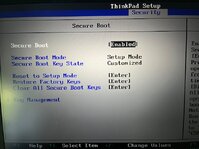
Die Prüfskripte sagen jedoch das Secureboot nicht aktiv ist und im BIOS werden auch nur die alten Zertifikate angezeigt.
08 Jul 2026
------------------------------------------------------------
HW : LENOVO 20UAS7B600
FW : LENOVO - N2WET52W (1.42 ) - 09 Apr 2026
OS : Windows 11 - 25H2 (Build 26200.8655)
Detected AMD64/X64 UEFI architecture. Ensure that this is correct for valid DBX results.
Secure Boot status: Disabled
Current UEFI PK
WARNUNG: Failed to query UEFI variable PK: Die Variable ist zurzeit nicht definiert: 0xC0000100
Default UEFI PK
√ Lenovo Ltd. PK CA 2012
Current UEFI KEK
√ Microsoft Corporation KEK CA 2011 (revoked: false)
X Microsoft Corporation KEK 2K CA 2023 (revoked: false)
√ Lenovo Ltd. KEK CA 2012 (revoked: false)
Default UEFI KEK
√ Microsoft Corporation KEK CA 2011 (revoked: false)
√ Microsoft Corporation KEK 2K CA 2023 (revoked: false)
√ Lenovo Ltd. KEK CA 2012 (revoked: false)
Current UEFI DB
√ Microsoft Windows Production PCA 2011 (revoked: false)
√ Microsoft Corporation UEFI CA 2011 (revoked: false)
X Windows UEFI CA 2023 (revoked: false)
X Microsoft UEFI CA 2023 (revoked: false)
X Microsoft Option ROM UEFI CA 2023 (revoked: false)
√ ThinkPad Product CA 2012 (revoked: false)
√ Lenovo UEFI CA 2014 (revoked: false)
Default UEFI DB
√ Microsoft Windows Production PCA 2011 (revoked: false)
√ Microsoft Corporation UEFI CA 2011 (revoked: false)
√ Windows UEFI CA 2023 (revoked: false)
√ Microsoft UEFI CA 2023 (revoked: false)
√ Microsoft Option ROM UEFI CA 2023 (revoked: false)
√ ThinkPad Product CA 2012 (revoked: false)
√ Lenovo UEFI CA 2014 (revoked: false)
Current UEFI DBX
2026-06-09 [AMD64] : FAIL: 223 failures, 220 successes detected
Windows BootMgr SVN : Not applied
Windows CDBoot SVN : Not applied
Windows WDSMgFw SVN : Not applied
Statistics : 13168 Bytes, 272 SHA256 hashes, 0 X.509 certs, 0 SVNs
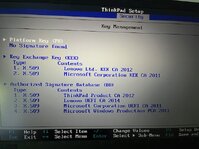
Restore Factory Keys jetzt als nächstes?
bevor ich mich an den M720q wende, habe ich mein X1C G8 auch bzgl. Secureboot und neue Zertifikate überprüft. Neuestes BIOS ist installiert (1.42?) und im BIOS ist auch Secureboot ausgewählt.
Die Prüfskripte sagen jedoch das Secureboot nicht aktiv ist und im BIOS werden auch nur die alten Zertifikate angezeigt.
08 Jul 2026
------------------------------------------------------------
HW : LENOVO 20UAS7B600
FW : LENOVO - N2WET52W (1.42 ) - 09 Apr 2026
OS : Windows 11 - 25H2 (Build 26200.8655)
Detected AMD64/X64 UEFI architecture. Ensure that this is correct for valid DBX results.
Secure Boot status: Disabled
Current UEFI PK
WARNUNG: Failed to query UEFI variable PK: Die Variable ist zurzeit nicht definiert: 0xC0000100
Default UEFI PK
√ Lenovo Ltd. PK CA 2012
Current UEFI KEK
√ Microsoft Corporation KEK CA 2011 (revoked: false)
X Microsoft Corporation KEK 2K CA 2023 (revoked: false)
√ Lenovo Ltd. KEK CA 2012 (revoked: false)
Default UEFI KEK
√ Microsoft Corporation KEK CA 2011 (revoked: false)
√ Microsoft Corporation KEK 2K CA 2023 (revoked: false)
√ Lenovo Ltd. KEK CA 2012 (revoked: false)
Current UEFI DB
√ Microsoft Windows Production PCA 2011 (revoked: false)
√ Microsoft Corporation UEFI CA 2011 (revoked: false)
X Windows UEFI CA 2023 (revoked: false)
X Microsoft UEFI CA 2023 (revoked: false)
X Microsoft Option ROM UEFI CA 2023 (revoked: false)
√ ThinkPad Product CA 2012 (revoked: false)
√ Lenovo UEFI CA 2014 (revoked: false)
Default UEFI DB
√ Microsoft Windows Production PCA 2011 (revoked: false)
√ Microsoft Corporation UEFI CA 2011 (revoked: false)
√ Windows UEFI CA 2023 (revoked: false)
√ Microsoft UEFI CA 2023 (revoked: false)
√ Microsoft Option ROM UEFI CA 2023 (revoked: false)
√ ThinkPad Product CA 2012 (revoked: false)
√ Lenovo UEFI CA 2014 (revoked: false)
Current UEFI DBX
2026-06-09 [AMD64] : FAIL: 223 failures, 220 successes detected
Windows BootMgr SVN : Not applied
Windows CDBoot SVN : Not applied
Windows WDSMgFw SVN : Not applied
Statistics : 13168 Bytes, 272 SHA256 hashes, 0 X.509 certs, 0 SVNs
Restore Factory Keys jetzt als nächstes?
Zuletzt bearbeitet von einem Moderator:




