- Registriert
- 29 Feb. 2008
- Beiträge
- 744
Hallo,
Ich habe Win XP Prof. und einen Thinkpad T61p. Ich habe einen externen Bildschirm LG Flatron L227WT, welcher per Dockingstation verbunden ist. Im Gerätemanager ist der LG aufgeführt und auch das ThinkPad Display.
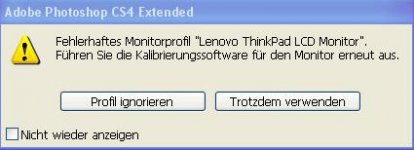
Wie kann ich es einstellen, dass automatisch das richtige Profil gewählt wird? Also wenn das Notebook in der Dockingstation ist, das Profil des LGs und sonst das Profil des Thinkpad Displays. Wenn ich nämlich Photoshop öffne kommt die Meldung siehe Anhang. Obwohl das Notebook in der Dockingstation ist steht in der Meldung Lenovo ThinkPad LCD Monitor und das Monitorprofil ist noch fehlerhaft. Photoshop funktioniert zwar trotzdem einwandfrei, aber das mit dem Monitor stört mich.
Ich habe Win XP Prof. und einen Thinkpad T61p. Ich habe einen externen Bildschirm LG Flatron L227WT, welcher per Dockingstation verbunden ist. Im Gerätemanager ist der LG aufgeführt und auch das ThinkPad Display.
Wie kann ich es einstellen, dass automatisch das richtige Profil gewählt wird? Also wenn das Notebook in der Dockingstation ist, das Profil des LGs und sonst das Profil des Thinkpad Displays. Wenn ich nämlich Photoshop öffne kommt die Meldung siehe Anhang. Obwohl das Notebook in der Dockingstation ist steht in der Meldung Lenovo ThinkPad LCD Monitor und das Monitorprofil ist noch fehlerhaft. Photoshop funktioniert zwar trotzdem einwandfrei, aber das mit dem Monitor stört mich.