




Hallo zusammen,
ich habe heute mein Thinkpad erhalten. Zuerst war ich positiv eingestellt- jetzt könnt ich es grad aus dem Fenster werfen...
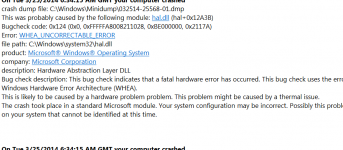
Sobald ich Win 7 (war vorinstalliert, mit Update CDs auf Win 8) starte erhalte ich einen Bluescreen. Habs dann nach mehreren Starts wieder rein geschafft und gleich mal WhoCrashed angeschalten (Ergebnis im ANhang). Ich google gleich mal das Ergebnis.... Bin momentan leider sehr angefressen!
Des Weiteren wollte ich mir eigentlich die Tage eine Samsung 840 Pro kaufen und diese als Partition für Win7 verwenden! Jetzt lese ich aber bei den Kollegen aus Amerika folgenden Thread:
http://forums.lenovo.com/t5/W-Serie...rick-a-W540-in-easy-steps/td-p/1400393/page/1
Zitat von Seite 2:
Ich zweifel gerade sehr, ob das die richtige Entscheidung war :/
Gibts noch andere im selben Boot?
LG
ich habe heute mein Thinkpad erhalten. Zuerst war ich positiv eingestellt- jetzt könnt ich es grad aus dem Fenster werfen...
Sobald ich Win 7 (war vorinstalliert, mit Update CDs auf Win 8) starte erhalte ich einen Bluescreen. Habs dann nach mehreren Starts wieder rein geschafft und gleich mal WhoCrashed angeschalten (Ergebnis im ANhang). Ich google gleich mal das Ergebnis.... Bin momentan leider sehr angefressen!
Des Weiteren wollte ich mir eigentlich die Tage eine Samsung 840 Pro kaufen und diese als Partition für Win7 verwenden! Jetzt lese ich aber bei den Kollegen aus Amerika folgenden Thread:
http://forums.lenovo.com/t5/W-Serie...rick-a-W540-in-easy-steps/td-p/1400393/page/1
Zitat von Seite 2:
I want to be clear and honest here. The other post mentioned by other's here is my colleague, I was unaware he posted. So this isn't two separate cases.
For what it is worth, this was the sequence:
1) Out distributor receives the machines with the 256Gb SSD in them, clones the drives to a Samsung 540 Pro 512Gb SSD, wipes the 256Gb SSD and ships them to us.
2) We ran the recovery CD set on the machine once received. At the end it asked us to reboot, we did.
3) We get the splash screen then it reboots itself
4) We get back to the splash screen and get stuck there. No beep POST, no way to get to the BIOS, boot from USB/CD or anything...Bricked. Resetting the BIOS, pulling the battery etc...no Dice.
So, when we got our second machine (with Windows 7 by the way, working), we decided to take the SSD from the bricked device and test it. We attached it to another machine via a USB device and could read contents etc. All seemed fine. We then put it into the second W540 and it bricked that one. So we have an SSD which will, in our mind, brick any W540...This seems VERY strange because I have never in my 20+ years come across a hard drive or SSD drive that can brick a machine.
If we take hard drive out, same issue...Freeze at splashscreen.
If we take out RAM, beeps signally missing RAM.
If we detatch and short the battery to clear the BIOS, same issue.
So far it looks like we are waiting for Lenovo to come out and change the motherboard.
Considering the recent issues with Samsung's with Linux, UEFI BIOS and Secure Boot, I am worried that end-users would easily be able to brick laptops.
We have two other W540 that we have not tested anything on, but will more than likely try and show them the behavior when they are on-site.
There is an option during recovery to wipe the drive or the partition. On a T440 we had blue screen during recovery when selecting partition only. When using the whole drive the recovery works well but takes an AGE and a half.
We have only converted over to Lenovo's due to another supplier's quality dropping, but it looks like either Lenovo's new machines are equally poor in the Q&A department or they are just getting over their initial run issues.
Ich zweifel gerade sehr, ob das die richtige Entscheidung war :/
Gibts noch andere im selben Boot?
LG

 Funktioniert mal wieder dein PC oder hast du schon sie begraben ??


