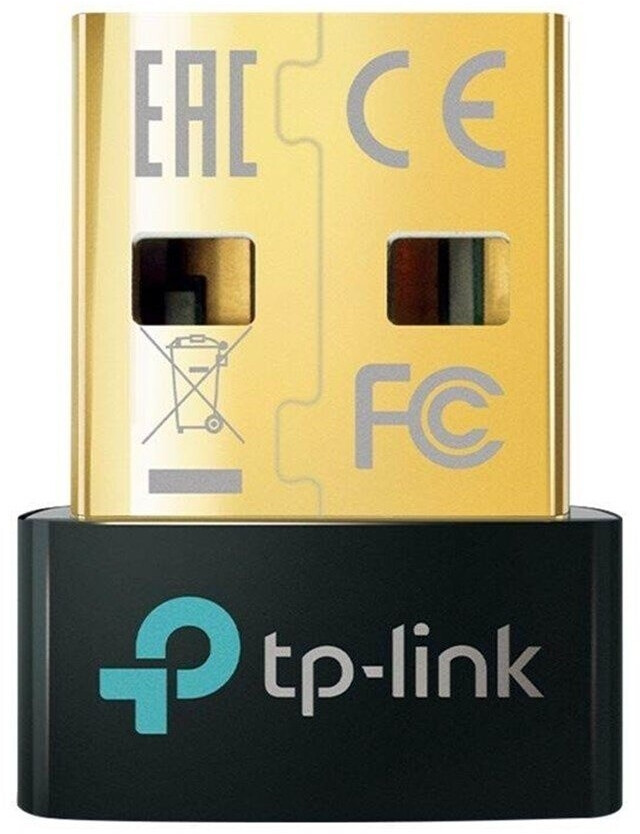
T4xx (T400-450 ohne "T440s/T450s") T420: Günstigstes Lösung für Bluetooth LE

omfk

Member
Themenstarter
Registriert
4 Nov. 2006
Beiträge
387
Hallo,

ich versuche gerade ein altes T420 unter Ubuntu zum Roboter-Programmieren (Wonder Dash) für meine Tochter herzurichten. Anscheinend ist aber die Bluetooth Unterstützung des T420 nicht ausreichend. Lt. https://www.makewonder.com/de/compatibility/ wird Bluetooth LE benötigt. Was ist die günstigste Lösung dies nachzurüsten?

VG
Frank
 
Kommt darauf an, WARUM er nicht erkannt wurde. Das wiederum sollte im Syslog zu finden sein.
 
Bei allen. Der Dongle benötigt mindestens Kernel 5.16, das ist bei allen aktuellen Distris gegeben. Für Ubuntu also 22.04.5 oder 24.04.1.
ubuntu 24.04.01 per ventoys vom USB-Stick
sudo dmesg | grep bluetooth
thinkpad_acpi: rfkill switch tpacpi_bluetooth_sw: radio is unblocked

sudo dmesg | grep btusb
usbcore: registered new interface driver btusb

lsusb
Bus 001 DEvice 003: ID 2357:0604 TP-Link TPuetooth Radio

sudo dmesg|grep tooth
usb 1-1.1: Product: TPuetooth Radio
usb 1-1.4: Product: Braodcom Bluetooth Device


Ältere USB-Kopfhörer werden erkannt (ich weiß allerdings nicht ob über den Dongle oder die interne Karte), eine Maus jedoch nicht.
 
Sieht man auch im Syslog. Wenn verbunden mit "usb 1-1.1", dann ist es der USB-Dongle.
 
Zwei Bluetooth Adapter ist blöd, weil Du nicht weißt, mit welchem das Pairing versucht wird. Der Interne muss deaktiviert werden. Zeig mal bitte
Bash:
rfkill list
 
Zwei Bluetooth Adapter ist blöd, weil Du nicht weißt, mit welchem das Pairing versucht wird. Der Interne muss deaktiviert werden. Zeig mal bitte
Bash:
rfkill list
So, jetzt auch vom betroffen Rechner direkt:
ubuntu@ubuntu:~$ rfkill list
0: tpacpi_bluetooth_sw: Bluetooth
Soft blocked: no
Hard blocked: no
1: tpacpi_wwan_sw: Wireless WAN
Soft blocked: no
Hard blocked: no
2: hci0: Bluetooth
Soft blocked: no
Hard blocked: no
3: hci1: Bluetooth
Soft blocked: no
Hard blocked: no
4: phy0: Wireless LAN
Soft blocked: no
Hard blocked: no
Beitrag automatisch zusammengeführt:

Sieht man auch im Syslog. Wenn verbunden mit "usb 1-1.1", dann ist es der USB-Dongle.
"Komplettes" syslog:
ubuntu@ubuntu:/var/log$ less syslog |grep tooth
2024-10-04T18:08:40.173340+00:00 ubuntu kernel: usb 1-1.1: Product: TP-Link Bluetooth USB Adapter
2024-10-04T18:08:40.173366+00:00 ubuntu kernel: usb 1-1.4: Product: Broadcom Bluetooth Device
2024-10-04T18:08:40.173558+00:00 ubuntu systemd[1]: Starting bluetooth.service - Bluetooth service...
2024-10-04T18:08:40.173582+00:00 ubuntu (uetoothd)[1929]: bluetooth.service: ConfigurationDirectory 'bluetooth' already exists but the mode is different. (File system: 755 ConfigurationDirectoryMode: 555)
2024-10-04T18:08:40.174017+00:00 ubuntu bluetoothd[1929]: Bluetooth daemon 5.72
2024-10-04T18:08:40.176798+00:00 ubuntu kernel: Bluetooth: Core ver 2.22
2024-10-04T18:08:40.176841+00:00 ubuntu kernel: Bluetooth: HCI device and connection manager initialized
2024-10-04T18:08:40.176863+00:00 ubuntu kernel: Bluetooth: HCI socket layer initialized
2024-10-04T18:08:40.176884+00:00 ubuntu kernel: Bluetooth: L2CAP socket layer initialized
2024-10-04T18:08:40.176906+00:00 ubuntu kernel: Bluetooth: SCO socket layer initialized
2024-10-04T18:08:40.177078+00:00 ubuntu kernel: thinkpad_acpi: rfkill switch tpacpi_bluetooth_sw: radio is unblocked
2024-10-04T18:08:40.177086+00:00 ubuntu kernel: Bluetooth: hci0: RTL: examining hci_ver=0a hci_rev=000b lmp_ver=0a lmp_subver=8761
2024-10-04T18:08:40.177087+00:00 ubuntu kernel: Bluetooth: hci0: RTL: rom_version status=0 version=1
2024-10-04T18:08:40.177088+00:00 ubuntu kernel: Bluetooth: hci0: RTL: loading rtl_bt/rtl8761bu_fw.bin
2024-10-04T18:08:40.177089+00:00 ubuntu kernel: Bluetooth: hci0: RTL: loading rtl_bt/rtl8761bu_config.bin
2024-10-04T18:08:40.177090+00:00 ubuntu kernel: Bluetooth: hci0: RTL: cfg_sz 6, total sz 30210
2024-10-04T18:08:40.177098+00:00 ubuntu kernel: Bluetooth: hci0: RTL: fw version 0xdfc6d922
2024-10-04T18:08:40.195439+00:00 ubuntu systemd[1]: Started bluetooth.service - Bluetooth service.
2024-10-04T18:08:40.211519+00:00 ubuntu systemd[1]: Reached target bluetooth.target - Bluetooth Support.
2024-10-04T18:08:40.217975+00:00 ubuntu bluetoothd[1929]: Starting SDP server
2024-10-04T18:08:40.397874+00:00 ubuntu bluetoothd[1929]: src/plugin.c:plugin_init() System does not support csip plugin
2024-10-04T18:08:40.397975+00:00 ubuntu bluetoothd[1929]: profiles/audio/micp.c:micp_init() D-Bus experimental not enabled
2024-10-04T18:08:40.398031+00:00 ubuntu bluetoothd[1929]: src/plugin.c:plugin_init() System does not support micp plugin
2024-10-04T18:08:40.398102+00:00 ubuntu bluetoothd[1929]: src/plugin.c:plugin_init() System does not support vcp plugin
2024-10-04T18:08:40.398163+00:00 ubuntu bluetoothd[1929]: src/plugin.c:plugin_init() System does not support mcp plugin
2024-10-04T18:08:40.398220+00:00 ubuntu bluetoothd[1929]: src/plugin.c:plugin_init() System does not support bass plugin
2024-10-04T18:08:40.398275+00:00 ubuntu bluetoothd[1929]: src/plugin.c:plugin_init() System does not support bap plugin
2024-10-04T18:08:40.521468+00:00 ubuntu kernel: Bluetooth: BNEP (Ethernet Emulation) ver 1.3
2024-10-04T18:08:40.521487+00:00 ubuntu kernel: Bluetooth: BNEP filters: protocol multicast
2024-10-04T18:08:40.521489+00:00 ubuntu kernel: Bluetooth: BNEP socket layer initialized
2024-10-04T18:08:40.522869+00:00 ubuntu dbus-daemon[1930]: [system] Activating via systemd: service name='org.freedesktop.hostname1' unit='dbus-org.freedesktop.hostname1.service' requested by ':1.5' (uid=0 pid=1929 comm="/usr/libexec/bluetooth/bluetoothd" label="unconfined")
2024-10-04T18:08:40.523563+00:00 ubuntu bluetoothd[1929]: Bluetooth management interface 1.22 initialized
2024-10-04T18:08:40.524861+00:00 ubuntu kernel: Bluetooth: MGMT ver 1.22
2024-10-04T18:08:40.528061+00:00 ubuntu bluetoothd[1929]: Battery Provider Manager created
2024-10-04T18:08:40.528148+00:00 ubuntu bluetoothd[1929]: profiles/sap/server.c:sap_server_register() Sap driver initialization failed.
2024-10-04T18:08:40.528207+00:00 ubuntu bluetoothd[1929]: sap-server: Operation not permitted (1)
2024-10-04T18:08:40.528278+00:00 ubuntu bluetoothd[1929]: Battery Provider Manager created
2024-10-04T18:08:40.524871+00:00 ubuntu kernel: Bluetooth: MGMT ver 1.22
2024-10-04T18:08:40.806640+00:00 ubuntu bluetoothd[1929]: profiles/sap/server.c:sap_server_register() Sap driver initialization failed.
2024-10-04T18:08:40.806727+00:00 ubuntu bluetoothd[1929]: sap-server: Operation not permitted (1)
2024-10-04T18:08:41.866186+00:00 ubuntu NetworkManager[2075]: <info> [1728065321.8652] Loaded device plugin: NMBluezManager (/usr/lib/x86_64-linux-gnu/NetworkManager/1.46.0/libnm-device-plugin-bluetooth.so)
2024-10-04T18:08:58.699136+00:00 ubuntu kernel: Bluetooth: RFCOMM TTY layer initialized
2024-10-04T18:08:58.699160+00:00 ubuntu kernel: Bluetooth: RFCOMM socket layer initialized
2024-10-04T18:08:58.699163+00:00 ubuntu kernel: Bluetooth: RFCOMM ver 1.11
2024-10-04T18:08:58.750054+00:00 ubuntu bluetoothd[1929]: Endpoint registered: sender=:1.39 path=/MediaEndpoint/A2DPSource/ldac
2024-10-04T18:08:58.750177+00:00 ubuntu bluetoothd[1929]: Endpoint registered: sender=:1.39 path=/MediaEndpoint/A2DPSink/aptx_hd
2024-10-04T18:08:58.750246+00:00 ubuntu bluetoothd[1929]: Endpoint registered: sender=:1.39 path=/MediaEndpoint/A2DPSource/aptx_hd
2024-10-04T18:08:58.750310+00:00 ubuntu bluetoothd[1929]: Endpoint registered: sender=:1.39 path=/MediaEndpoint/A2DPSink/aptx
2024-10-04T18:08:58.750375+00:00 ubuntu bluetoothd[1929]: Endpoint registered: sender=:1.39 path=/MediaEndpoint/A2DPSource/aptx
2024-10-04T18:08:58.750449+00:00 ubuntu bluetoothd[1929]: Endpoint registered: sender=:1.39 path=/MediaEndpoint/A2DPSink/sbc
2024-10-04T18:08:58.750513+00:00 ubuntu bluetoothd[1929]: Endpoint registered: sender=:1.39 path=/MediaEndpoint/A2DPSource/sbc
2024-10-04T18:08:58.750617+00:00 ubuntu bluetoothd[1929]: Endpoint registered: sender=:1.39 path=/MediaEndpoint/A2DPSink/sbc_xq
2024-10-04T18:08:58.750832+00:00 ubuntu bluetoothd[1929]: Endpoint registered: sender=:1.39 path=/MediaEndpoint/A2DPSource/sbc_xq
2024-10-04T18:08:58.751037+00:00 ubuntu bluetoothd[1929]: Endpoint registered: sender=:1.39 path=/MediaEndpoint/A2DPSource/aptx_ll_1
2024-10-04T18:08:58.751258+00:00 ubuntu bluetoothd[1929]: Endpoint registered: sender=:1.39 path=/MediaEndpoint/A2DPSource/aptx_ll_0
2024-10-04T18:08:58.751469+00:00 ubuntu bluetoothd[1929]: Endpoint registered: sender=:1.39 path=/MediaEndpoint/A2DPSource/aptx_ll_duplex_1
2024-10-04T18:08:58.751749+00:00 ubuntu bluetoothd[1929]: Endpoint registered: sender=:1.39 path=/MediaEndpoint/A2DPSource/aptx_ll_duplex_0
2024-10-04T18:08:58.752076+00:00 ubuntu bluetoothd[1929]: Endpoint registered: sender=:1.39 path=/MediaEndpoint/A2DPSource/faststream
2024-10-04T18:08:58.752345+00:00 ubuntu bluetoothd[1929]: Endpoint registered: sender=:1.39 path=/MediaEndpoint/A2DPSource/faststream_duplex
2024-10-04T18:08:58.752586+00:00 ubuntu bluetoothd[1929]: Endpoint registered: sender=:1.39 path=/MediaEndpoint/A2DPSink/opus_05
2024-10-04T18:08:58.752813+00:00 ubuntu bluetoothd[1929]: Endpoint registered: sender=:1.39 path=/MediaEndpoint/A2DPSource/opus_05
2024-10-04T18:08:58.753289+00:00 ubuntu bluetoothd[1929]: Endpoint registered: sender=:1.39 path=/MediaEndpoint/A2DPSink/opus_05_duplex
2024-10-04T18:08:58.753419+00:00 ubuntu bluetoothd[1929]: Endpoint registered: sender=:1.39 path=/MediaEndpoint/A2DPSource/opus_05_duplex
2024-10-04T18:08:58.753623+00:00 ubuntu bluetoothd[1929]: Endpoint registered: sender=:1.39 path=/MediaEndpoint/A2DPSource/ldac
2024-10-04T18:08:58.753719+00:00 ubuntu bluetoothd[1929]: Endpoint registered: sender=:1.39 path=/MediaEndpoint/A2DPSink/aptx_hd
2024-10-04T18:08:58.753791+00:00 ubuntu bluetoothd[1929]: Endpoint registered: sender=:1.39 path=/MediaEndpoint/A2DPSource/aptx_hd
2024-10-04T18:08:58.753860+00:00 ubuntu bluetoothd[1929]: Endpoint registered: sender=:1.39 path=/MediaEndpoint/A2DPSink/aptx
2024-10-04T18:08:58.753928+00:00 ubuntu bluetoothd[1929]: Endpoint registered: sender=:1.39 path=/MediaEndpoint/A2DPSource/aptx
2024-10-04T18:08:58.753998+00:00 ubuntu bluetoothd[1929]: Endpoint registered: sender=:1.39 path=/MediaEndpoint/A2DPSink/sbc
2024-10-04T18:08:58.754069+00:00 ubuntu bluetoothd[1929]: Endpoint registered: sender=:1.39 path=/MediaEndpoint/A2DPSource/sbc
2024-10-04T18:08:58.754222+00:00 ubuntu bluetoothd[1929]: Endpoint registered: sender=:1.39 path=/MediaEndpoint/A2DPSink/sbc_xq
2024-10-04T18:08:58.754312+00:00 ubuntu bluetoothd[1929]: Endpoint registered: sender=:1.39 path=/MediaEndpoint/A2DPSource/sbc_xq
2024-10-04T18:08:58.754403+00:00 ubuntu bluetoothd[1929]: Endpoint registered: sender=:1.39 path=/MediaEndpoint/A2DPSource/aptx_ll_1
2024-10-04T18:08:58.754490+00:00 ubuntu bluetoothd[1929]: Endpoint registered: sender=:1.39 path=/MediaEndpoint/A2DPSource/aptx_ll_0
2024-10-04T18:08:58.754577+00:00 ubuntu bluetoothd[1929]: Endpoint registered: sender=:1.39 path=/MediaEndpoint/A2DPSource/aptx_ll_duplex_1
2024-10-04T18:08:58.754680+00:00 ubuntu bluetoothd[1929]: Endpoint registered: sender=:1.39 path=/MediaEndpoint/A2DPSource/aptx_ll_duplex_0
2024-10-04T18:08:58.754768+00:00 ubuntu bluetoothd[1929]: Endpoint registered: sender=:1.39 path=/MediaEndpoint/A2DPSource/faststream
2024-10-04T18:08:58.754833+00:00 ubuntu bluetoothd[1929]: Endpoint registered: sender=:1.39 path=/MediaEndpoint/A2DPSource/faststream_duplex
2024-10-04T18:08:58.754897+00:00 ubuntu bluetoothd[1929]: Endpoint registered: sender=:1.39 path=/MediaEndpoint/A2DPSink/opus_05
2024-10-04T18:08:58.754962+00:00 ubuntu bluetoothd[1929]: Endpoint registered: sender=:1.39 path=/MediaEndpoint/A2DPSource/opus_05
2024-10-04T18:08:58.755025+00:00 ubuntu bluetoothd[1929]: Endpoint registered: sender=:1.39 path=/MediaEndpoint/A2DPSink/opus_05_duplex
2024-10-04T18:08:58.755088+00:00 ubuntu bluetoothd[1929]: Endpoint registered: sender=:1.39 path=/MediaEndpoint/A2DPSource/opus_05_duplex
2024-10-04T18:31:34.073004+00:00 ubuntu systemd[2413]: Started app-gnome-gnome\x2dbluetooth\x2dpanel-7443.scope - Application launched by gnome-shell.
2024-10-04T18:31:35.142715+00:00 ubuntu dbus-daemon[2435]: [session uid=1000 pid=2435] Activating via systemd: service name='org.bluez.obex' unit='obex.service' requested by ':1.136' (uid=1000 pid=7443 comm="/usr/bin/gnome-control-center bluetooth" label="unconfined")
2024-10-04T18:31:35.153389+00:00 ubuntu systemd[2413]: Starting obex.service - Bluetooth OBEX service...
2024-10-04T18:31:35.203362+00:00 ubuntu systemd[2413]: Started obex.service - Bluetooth OBEX service.
2024-10-04T18:31:37.021475+00:00 ubuntu systemd[2413]: Reached target bluetooth.target - Bluetooth.
2024-10-04T18:32:06.745275+00:00 ubuntu bluetoothd[1929]: src/profile.c:ext_io_disconnected() Unable to get io data for Hands-Free Voice gateway: getpeername: Transport endpoint is not connected (107)
2024-10-04T18:32:18.609680+00:00 ubuntu bluetoothd[1929]: src/device.c:device_add_connection() Device 50:18:12:3A:81:72 is already connected
2024-10-04T18:32:18.609898+00:00 ubuntu bluetoothd[1929]: Device is already marked as connected
2024-10-04T18:32:25.657933+00:00 ubuntu bluetoothd[1929]: src/service.c:btd_service_connect() a2dp-sink profile connect failed for 50:18:12:3A:81:72: Device or resource busy
 
Zuletzt bearbeitet:
Bash:
rfkill block 0
schaltet das interne Bluetooth aus. Danach die Maus nochmal probieren.
 
Bash:
rfkill block 0
schaltet das interne Bluetooth aus. Danach die Maus nochmal probieren.
ubuntu@ubuntu:/var/log$ rfkill block 0
ubuntu@ubuntu:/var/log$ rfkill list
0: tpacpi_bluetooth_sw: Bluetooth
Soft blocked: yes
Hard blocked: no
1: tpacpi_wwan_sw: Wireless WAN
Soft blocked: no
Hard blocked: no
2: hci0: Bluetooth
Soft blocked: no
Hard blocked: no
4: phy0: Wireless LAN
Soft blocked: no
Hard blocked: no

Erfindet aber die Maus noch immer nicht. Stattdessen habe ich x-mal die Kopfhörer als "Disconnected" aufgeführt.
 
Kann auch sein, dass die Maus nicht "gemocht" wird. Zeig mal

sudo dmesg | grep btusb

Nur den Ausschnitt des Pairingversuchs mit der Maus am Ende.
 
Kann auch sein, dass die Maus nicht "gemocht" wird. Zeig mal

sudo dmesg | grep btusb

Nur den Ausschnitt des Pairingversuchs mit der Maus am Ende.
ubuntu@ubuntu:~$ sudo dmesg|grep btusb
[ 16.238444] usbcore: registered new interface driver btusb
ubuntu@ubuntu:~$
Beitrag automatisch zusammengeführt:

ubuntu@ubuntu:~$ sudo dmesg|grep btusb
[ 16.238444] usbcore: registered new interface driver btusb
ubuntu@ubuntu:~$

aus dem syslog. Warum ist jetzt usb 1-1.4 der Broadcom und nicht TPlink?
2024-10-04T20:18:39.459446+00:00 ubuntu kernel: usb 1-1.4: Product: Broadcom Bluetooth Device
2024-10-04T20:18:39.513270+00:00 ubuntu kernel: Bluetooth: MGMT ver 1.22
2024-10-04T20:18:39.513571+00:00 ubuntu bluetoothd[1929]: Battery Provider Manager created
2024-10-04T20:18:39.513672+00:00 ubuntu bluetoothd[1929]: profiles/sap/server.c:sap_server_register() Sap driver initialization failed.
2024-10-04T20:18:39.513742+00:00 ubuntu bluetoothd[1929]: sap-server: Operation not permitted (1)
2024-10-04T20:18:39.521227+00:00 ubuntu bluetoothd[1929]: Endpoint registered: sender=:1.39 path=/MediaEndpoint/A2DPSource/ldac
2024-10-04T20:18:39.521356+00:00 ubuntu bluetoothd[1929]: Endpoint registered: sender=:1.39 path=/MediaEndpoint/A2DPSink/aptx_hd
2024-10-04T20:18:39.521422+00:00 ubuntu bluetoothd[1929]: Endpoint registered: sender=:1.39 path=/MediaEndpoint/A2DPSource/aptx_hd
2024-10-04T20:18:39.521491+00:00 ubuntu bluetoothd[1929]: Endpoint registered: sender=:1.39 path=/MediaEndpoint/A2DPSink/aptx
2024-10-04T20:18:39.521558+00:00 ubuntu bluetoothd[1929]: Endpoint registered: sender=:1.39 path=/MediaEndpoint/A2DPSource/aptx
2024-10-04T20:18:39.521639+00:00 ubuntu bluetoothd[1929]: Endpoint registered: sender=:1.39 path=/MediaEndpoint/A2DPSink/sbc
2024-10-04T20:18:39.521927+00:00 ubuntu bluetoothd[1929]: Endpoint registered: sender=:1.39 path=/MediaEndpoint/A2DPSource/sbc
2024-10-04T20:18:39.522045+00:00 ubuntu bluetoothd[1929]: Endpoint registered: sender=:1.39 path=/MediaEndpoint/A2DPSink/sbc_xq
2024-10-04T20:18:39.522162+00:00 ubuntu bluetoothd[1929]: Endpoint registered: sender=:1.39 path=/MediaEndpoint/A2DPSource/sbc_xq
2024-10-04T20:18:39.522293+00:00 ubuntu bluetoothd[1929]: Endpoint registered: sender=:1.39 path=/MediaEndpoint/A2DPSource/aptx_ll_1
2024-10-04T20:18:39.522397+00:00 ubuntu bluetoothd[1929]: Endpoint registered: sender=:1.39 path=/MediaEndpoint/A2DPSource/aptx_ll_0
2024-10-04T20:18:39.522471+00:00 ubuntu bluetoothd[1929]: Endpoint registered: sender=:1.39 path=/MediaEndpoint/A2DPSource/aptx_ll_duplex_1
2024-10-04T20:18:39.522545+00:00 ubuntu bluetoothd[1929]: Endpoint registered: sender=:1.39 path=/MediaEndpoint/A2DPSource/aptx_ll_duplex_0
2024-10-04T20:18:39.522611+00:00 ubuntu bluetoothd[1929]: Endpoint registered: sender=:1.39 path=/MediaEndpoint/A2DPSource/faststream
2024-10-04T20:18:39.522677+00:00 ubuntu bluetoothd[1929]: Endpoint registered: sender=:1.39 path=/MediaEndpoint/A2DPSource/faststream_duplex
2024-10-04T20:18:39.522745+00:00 ubuntu bluetoothd[1929]: Endpoint registered: sender=:1.39 path=/MediaEndpoint/A2DPSink/opus_05
2024-10-04T20:18:39.522814+00:00 ubuntu bluetoothd[1929]: Endpoint registered: sender=:1.39 path=/MediaEndpoint/A2DPSource/opus_05
2024-10-04T20:18:39.522888+00:00 ubuntu bluetoothd[1929]: Endpoint registered: sender=:1.39 path=/MediaEndpoint/A2DPSink/opus_05_duplex
2024-10-04T20:18:39.523014+00:00 ubuntu bluetoothd[1929]: Endpoint registered: sender=:1.39 path=/MediaEndpoint/A2DPSource/opus_05_duplex
 
Das ist genau das, was ich befürchtet habe. Die beiden BT-Geräte scheinen sich gegenseitig im Wege zu stehen.
 
Warum ist jetzt usb 1-1.4 der Broadcom und nicht TPlink?
Keine Ahnung. Die dmesg Ausgabe zeigt jedenfalls ein Headset, mach das mal aus. Dann ziehst Du mal den Dongle ab, machst
Bash:
rfkill block bluetooth
und steckst den Dongle wieder an. Dann zeig nochmal
Bash:
lsusb
rfkill list
sudo dmesg | grep btusb

Das ist genau das, was ich befürchtet habe. Die beiden BT-Geräte scheinen sich gegenseitig im Wege zu stehen.
Erstmal möchte ich versuchen das Interne softwareseitig abzuschalten, bevor der TE den Schraubendreher schwingen muss.
 
Keine Ahnung. Die dmesg Ausgabe zeigt jedenfalls ein Headset, mach das mal aus. Dann ziehst Du mal den Dongle ab, machst
Bash:
rfkill block bluetooth
und steckst den Dongle wieder an. Dann zeig nochmal
Bash:
lsusb
rfkill list
sudo dmesg | grep btusb


Erstmal möchte ich versuchen das Interne softwareseitig abzuschalten, bevor der TE den Schraubendreher schwingen muss.
ubuntu@ubuntu:/var/log$ rfkill block bluetooth
ubuntu@ubuntu:/var/log$ lsusb
Bus 001 Device 001: ID 1d6b:0002 Linux Foundation 2.0 root hub
Bus 001 Device 002: ID 8087:0024 Intel Corp. Integrated Rate Matching Hub
Bus 001 Device 005: ID 04f2:b221 Chicony Electronics Co., Ltd integrated camera
Bus 001 Device 012: ID 2357:0604 TP-Link TP-Link Bluetooth USB Adapter
Bus 002 Device 001: ID 1d6b:0002 Linux Foundation 2.0 root hub
Bus 002 Device 002: ID 8087:0024 Intel Corp. Integrated Rate Matching Hub
Bus 002 Device 003: ID 18a5:0302 Verbatim, Ltd Flash Drive
Bus 002 Device 004: ID 0bdb:1911 Ericsson Business Mobile Networks BV F5521gw
ubuntu@ubuntu:/var/log$ rfkill list
0: tpacpi_bluetooth_sw: Bluetooth
Soft blocked: yes
Hard blocked: no
1: tpacpi_wwan_sw: Wireless WAN
Soft blocked: no
Hard blocked: no
4: phy0: Wireless LAN
Soft blocked: no
Hard blocked: no
11: hci0: Bluetooth
Soft blocked: no
Hard blocked: no
Beitrag automatisch zusammengeführt:

ubuntu@ubuntu:/var/log$ rfkill block bluetooth
ubuntu@ubuntu:/var/log$ lsusb
Bus 001 Device 001: ID 1d6b:0002 Linux Foundation 2.0 root hub
Bus 001 Device 002: ID 8087:0024 Intel Corp. Integrated Rate Matching Hub
Bus 001 Device 005: ID 04f2:b221 Chicony Electronics Co., Ltd integrated camera
Bus 001 Device 012: ID 2357:0604 TP-Link TP-Link Bluetooth USB Adapter
Bus 002 Device 001: ID 1d6b:0002 Linux Foundation 2.0 root hub
Bus 002 Device 002: ID 8087:0024 Intel Corp. Integrated Rate Matching Hub
Bus 002 Device 003: ID 18a5:0302 Verbatim, Ltd Flash Drive
Bus 002 Device 004: ID 0bdb:1911 Ericsson Business Mobile Networks BV F5521gw
ubuntu@ubuntu:/var/log$ rfkill list
0: tpacpi_bluetooth_sw: Bluetooth
Soft blocked: yes
Hard blocked: no
1: tpacpi_wwan_sw: Wireless WAN
Soft blocked: no
Hard blocked: no
4: phy0: Wireless LAN
Soft blocked: no
Hard blocked: no
11: hci0: Bluetooth
Soft blocked: no
Hard blocked: no
Nach längerem Warten (15min) findet er jetzt die Maus. Den Dash-Roboter kann ich leider erst morgen wieder testen.
Beitrag automatisch zusammengeführt:

Update: Den Dash findet Ubuntu auch. Auch nach einem Suspend funktioniert alles.

https://code.makewonder.com/blockly/ meldet dann leider bei Firefox und Chromium, dass ein "unsupported browser" verwendet wird. Wenn ich dann dort versuche den Dash zu koppeln kommt folgende Fehlermeldung: "This device in not supported Bluetooth or Bluetooth is not enabled."

Beitrag automatisch zusammengeführt:

ubuntu@ubuntu:/var/log$ rfkill block bluetooth
ubuntu@ubuntu:/var/log$ lsusb
Bus 001 Device 001: ID 1d6b:0002 Linux Foundation 2.0 root hub
Bus 001 Device 002: ID 8087:0024 Intel Corp. Integrated Rate Matching Hub
Bus 001 Device 005: ID 04f2:b221 Chicony Electronics Co., Ltd integrated camera
Bus 001 Device 012: ID 2357:0604 TP-Link TP-Link Bluetooth USB Adapter
Bus 002 Device 001: ID 1d6b:0002 Linux Foundation 2.0 root hub
Bus 002 Device 002: ID 8087:0024 Intel Corp. Integrated Rate Matching Hub
Bus 002 Device 003: ID 18a5:0302 Verbatim, Ltd Flash Drive
Bus 002 Device 004: ID 0bdb:1911 Ericsson Business Mobile Networks BV F5521gw
ubuntu@ubuntu:/var/log$ rfkill list
0: tpacpi_bluetooth_sw: Bluetooth
Soft blocked: yes
Hard blocked: no
1: tpacpi_wwan_sw: Wireless WAN
Soft blocked: no
Hard blocked: no
4: phy0: Wireless LAN
Soft blocked: no
Hard blocked: no
11: hci0: Bluetooth
Soft blocked: no
Hard blocked: no
Beitrag automatisch zusammengeführt:


Nach längerem Warten (15min) findet er jetzt die Maus. Den Dash-Roboter kann ich leider erst morgen wieder testen.
Beitrag automatisch zusammengeführt:

Update: Den Dash findet Ubuntu auch. Auch nach einem Suspend funktioniert alles.

https://code.makewonder.com/blockly/ meldet dann leider bei Firefox und Chromium, dass ein "unsupported browser" verwendet wird. Wenn ich dann dort versuche den Dash zu koppeln kommt folgende Fehlermeldung: "This device in not supported Bluetooth or Bluetooth is not enabled."


Idee meinerseits: Vll. schauen die Browser nur auf die interne Bluetooth Karte. Wie kann ich die testweise mal hardwareseitig deaktivieren?
 
Zuletzt bearbeitet:
  • ok1.de
  • thinkstore24.de
  • ok2.de - Notebook Computer Server
  • Preiswerte-IT - Gebrauchte Lenovo Notebooks kaufen

Werbung

Zurück
Oben