[gelöst] Ubuntu 10.04.2 nicht alle Aktualisierungen werden angezeigt

Jonathan Hard

Member
Themenstarter
Registriert
17 Juli 2009
Beiträge
235
Hallo Leute,

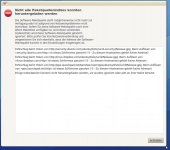
seit einigen Wochen hab ich auf all meinen Systemen zwei Aktualisierungen die nicht angezeigt werden (siehe Screenshot). Kann, soll oder muss ich da was tun.
screenshot_001.jpg

edit: Screenshot erneuert.
 
Zuletzt bearbeitet:
Bild ist über den Jordan... würde tippen das sind die Kernel-Updates - probier mal "sudo apt-get update && sudo apt-get upgrade" - da sagt er dir dann welche Updates zurückgehalten werden. mit "sudo apt-get dist-upgrade" kannste die dann installieren.
Aber der Screenshot würde sicherlich helfen das zu klären ;)
 
Zuletzt bearbeitet:
Zeig besser die Ausgabe der von michael_dugan vorgeschlagenen Befehle (ist einfacher und effektiver als ein Screenshot):
Code:
sudo apt-get update
sudo apt-get dist-upgrade
 
gerne:

Code:
OK   http://security.ubuntu.com lucid-security Release.gpg
Ign http://security.ubuntu.com/ubuntu/ lucid-security/main Translation-de
Ign http://security.ubuntu.com/ubuntu/ lucid-security/restricted Translation-de
OK   http://de.archive.ubuntu.com lucid Release.gpg
OK   http://de.archive.ubuntu.com/ubuntu/ lucid/main Translation-de
OK   http://de.archive.ubuntu.com/ubuntu/ lucid/restricted Translation-de
Ign http://security.ubuntu.com/ubuntu/ lucid-security/universe Translation-de
Ign http://security.ubuntu.com/ubuntu/ lucid-security/multiverse Translation-de
OK   http://de.archive.ubuntu.com/ubuntu/ lucid/universe Translation-de
OK   http://de.archive.ubuntu.com/ubuntu/ lucid/multiverse Translation-de
OK   http://de.archive.ubuntu.com lucid-updates Release.gpg
Ign http://de.archive.ubuntu.com/ubuntu/ lucid-updates/main Translation-de
Ign http://de.archive.ubuntu.com/ubuntu/ lucid-updates/restricted Translation-de
Ign http://de.archive.ubuntu.com/ubuntu/ lucid-updates/universe Translation-de
Ign http://de.archive.ubuntu.com/ubuntu/ lucid-updates/multiverse Translation-de
OK   http://ppa.launchpad.net lucid Release.gpg
Ign http://ppa.launchpad.net/glasen/intel-driver/ubuntu/ lucid/main Translation-de
OK   http://ppa.launchpad.net lucid Release.gpg
Ign http://ppa.launchpad.net/ferramroberto/vlc/ubuntu/ lucid/main Translation-de
OK   http://ppa.launchpad.net lucid Release.gpg
Ign http://ppa.launchpad.net/anonbeat/guayadeque/ubuntu/ lucid/main Translation-de
OK   http://ppa.launchpad.net lucid Release.gpg
Ign http://ppa.launchpad.net/mozillateam/firefox-stable/ubuntu/ lucid/main Translation-de
OK   http://ppa.launchpad.net lucid Release.gpg
Ign http://ppa.launchpad.net/linrunner/tlp/ubuntu/ lucid/main Translation-de
OK   http://security.ubuntu.com lucid-security Release
OK   http://de.archive.ubuntu.com lucid Release
OK   http://linux.dropbox.com lucid Release.gpg
Ign http://linux.dropbox.com/ubuntu/ lucid/main Translation-de
OK   http://download.virtualbox.org lucid Release.gpg
OK   http://de.archive.ubuntu.com lucid-updates Release
OK   http://security.ubuntu.com lucid-security/main Packages
Hole:1 http://dl.google.com stable Release.gpg [198B]
OK   http://ppa.launchpad.net lucid Release.gpg
Ign http://ppa.launchpad.net/pidgin-developers/ppa/ubuntu/ lucid/main Translation-de
OK   http://ppa.launchpad.net lucid Release
OK   http://linux.dropbox.com lucid Release
OK   http://de.archive.ubuntu.com lucid/main Packages
Ign http://download.virtualbox.org/virtualbox/debian/ lucid/contrib Translation-de
OK   http://de.archive.ubuntu.com lucid/restricted Packages
OK   http://de.archive.ubuntu.com lucid/main Sources
OK   http://de.archive.ubuntu.com lucid/restricted Sources
OK   http://de.archive.ubuntu.com lucid/universe Packages
OK   http://security.ubuntu.com lucid-security/restricted Packages
OK   http://security.ubuntu.com lucid-security/main Sources
OK   http://security.ubuntu.com lucid-security/restricted Sources
OK   http://security.ubuntu.com lucid-security/universe Packages
OK   http://security.ubuntu.com lucid-security/universe Sources
OK   http://security.ubuntu.com lucid-security/multiverse Packages
OK   http://security.ubuntu.com lucid-security/multiverse Sources
OK   http://de.archive.ubuntu.com lucid/universe Sources
OK   http://de.archive.ubuntu.com lucid/multiverse Packages
OK   http://de.archive.ubuntu.com lucid/multiverse Sources
OK   http://linux.dropbox.com lucid/main Packages
OK   http://de.archive.ubuntu.com lucid-updates/main Packages
OK   http://de.archive.ubuntu.com lucid-updates/restricted Packages
OK   http://de.archive.ubuntu.com lucid-updates/main Sources
OK   http://de.archive.ubuntu.com lucid-updates/restricted Sources
OK   http://de.archive.ubuntu.com lucid-updates/universe Packages
OK   http://ppa.launchpad.net lucid Release
OK   http://download.virtualbox.org lucid Release
OK   http://de.archive.ubuntu.com lucid-updates/universe Sources
OK   http://de.archive.ubuntu.com lucid-updates/multiverse Packages
OK   http://ppa.launchpad.net lucid/main Packages
OK   http://de.archive.ubuntu.com lucid-updates/multiverse Sources
OK   http://ppa.launchpad.net lucid/main Packages
OK   http://download.virtualbox.org lucid/contrib Packages
Ign http://dl.google.com/linux/earth/deb/ stable/main Translation-de
Hole:2 http://dl.google.com stable Release [1.338B]
Hole:3 http://dl.google.com stable/main Packages [464B]
Es wurden 2.000B in 6s geholt (308B/s)
Paketlisten werden gelesen...
Code:
Paketlisten werden gelesen... Fertig
Abhängigkeitsbaum wird aufgebaut       
Status-Informationen einlesen... Fertig
0 aktualisiert, 0 neu installiert, 0 zu entfernen und 0 nicht aktualisiert.
 
Ok, da er keine zurückgehaltenen Updates moniert, wäre es vielleicht doch sinnvoll wenn du nochmal den Screenshot nachliefern könntest.
 
Problem gelöst: Ich hatte mal vor ewigen Zeiten die Wine Version 1.2 manuell gesperrt. Daher wurden diese Pakete nicht aktualisiert.
 
Wenn dein Problem gelöst ist, dann kapere ich mal kurz deinen Thread für eine kurze Frage meinerseits:
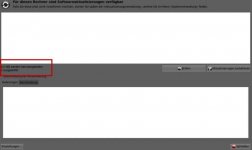
Meist habe ich mit der Aktualisierungsverwaltung das Problem, dass nachstehende Fehlermeldung auftritt. Das beunruhigt mich ein wenig, da security.ubuntu.com irgendwie wichtig klingt ;) Diese Fehlermeldung erscheint, wenn ich auf "Prüfen" gehe. Danach sind aber meist trotzdem alle möglichen Updates im Angebot.

Hat jemand eine Idee, was da los ist?

Grüße
bassplayer
 

Anhänge

  • Bildschirmfoto-1.jpg
    Bildschirmfoto-1.jpg
    46,7 KB · Aufrufe: 6
ist etwas Schlimmes passiert
:facepalm:

Die Eindeutschung ist ja furchterregend. Das bedeutet nur, daß Server vorübergehend nicht erreicht werden konnten wg. eines Problems mit der Namensauflösung.
 
Danke :)
Das würde auch erklären, weshalb der Fehler nicht jedes Mal auftritt. Gefühlt aber in 70 % aller Fälle. Dann brauche ich mir ja keine Sorgen zu machen.

Danke und Grüße
bassplayer
 
  • ok1.de
  • thinkstore24.de
  • ok2.de - Notebook Computer Server
  • Preiswerte-IT - Gebrauchte Lenovo Notebooks kaufen

Werbung

Zurück
Oben